Alat Terbaik untuk Guru Vokal dan Pelatih Menyanyi
Murid Anda berlatih di rumah seperti kebanyakan penyanyi saat ini: mereka membuka karaoke atau backing track di YouTube lalu ikut bernyanyi. Hanya ada satu masalah — lagunya hampir tidak pernah berada di nada yang cocok untuk suara mereka. Sebagian besar setiap pelajaran adalah membantu tiap murid menemukan nada yang tepat untuk jangkauannya, agar refrain tidak lagi dipaksakan dan nada rendah tetap tertopang.
Sebagai guru vokal atau pelatih menyanyi, Anda butuh cara cepat dan andal untuk memindahkan lagu apa pun ke kunci yang tepat — secara langsung saat pelajaran maupun untuk latihan di rumah. Inilah dua alat KeyPitch yang membuatnya mudah: pengubah kunci gratis secara real-time untuk YouTube, dan Audio Studio online untuk menyiapkan, membagikan, dan menata trek latihan yang sempurna. Bersama-sama, keduanya membentuk ekosistem lengkap bagi siapa pun yang bermusik — itulah sebabnya makin banyak guru, pelatih, dan murid beralih ke KeyPitch.
- Equalizer 10 band di Studio Audio — enam preset: Bass, Vokal, Treble, Hangat, Cerah, dan Loudness. Vokal menonjolkan suara saat murid mempelajari melodi, dan pengaturannya ikut ke file yang diekspor.
- Loop A/B di Rekaman saya — simpan hanya bagian yang sedang dilatih murid, beserta pengaturannya: bagian itu terbuka lagi di Mode latihan pada pelajaran berikutnya.
- Mode Studio di ekstensi gratis — KeyPitch terbuka di panel samping tepat di sebelah video YouTube, dalam mode bioskop, dengan equalizer 10 band, loop A/B yang bisa disimpan di pustaka, dan tab Ruang saya tempat murid memantau streak latihan mereka.
- Pustaka di ekstensi gratis — simpan setiap lagu YouTube beserta pengaturan persisnya dan buka lagi dengan 1 klik. Folder dan lagu tanpa batas, ditata dengan seret dan lepas, disimpan secara lokal di browser Anda.
- Tautan berbagi di Audio Studio — kirim tautan yang membuka file Anda dengan pengaturan persis Anda, berlaku 7 hari. Murid Anda juga bisa mengirimkan tautan mereka dengan cara yang sama.
- Pustaka di Audio Studio — satu folder per murid, dengan setiap lagu yang pernah Anda latih bersama tersimpan di kunci yang tepat.
- Mode latihan di Studio Audio — di komputer, video atau lirik memenuhi layar, semua pengaturan pindah ke kanan, dan loop A/B mengulang frasa yang sedang dilatih, dan bilah navigasi menghilang agar layar lebih bersih. 5 menit per hari gratis, tanpa batas dengan langganan.
- Analisis lagu dan pemutar sungguhan — kunci, tempo, dan kode Camelot setiap file di balik tombol ⓘ, ditambah kembali ke awal dan ±5 detik untuk bergerak di dalam lagu. Gratis.
Metode yang dipakai guru menyanyi terbaik
Tujuannya sederhana: setiap murid harus berlatih di nada yang cocok dengan suaranya, baik di pelajaran maupun di rumah. KeyPitch memberi Anda dua cara yang saling melengkapi untuk melakukannya.
- Saat pelajaran, kerjakan secara langsung. Buka lagunya di YouTube dan gunakan ekstensi KeyPitch gratis untuk mengubah nada secara real-time sampai pas di jangkauan murid Anda.
- Untuk latihan di rumah, siapkan trek. Unggah lagunya ke KeyPitch Audio Studio, transpose ke nada yang tepat, lalu unduh file yang sudah diedit.
- Kirimkan. Bagikan tautan yang membuka trek dengan pengaturan persis Anda, atau kirim filenya lewat email agar murid bisa berlatih di mana saja — offline, tanpa iklan, tanpa pengaturan.
- Simpan. Simpan lagu di folder milik murid tersebut — di ekstensi atau di Audio Studio — dan temukan lagi dengan 1 klik di pelajaran berikutnya.
Alat 1 — Ekstensi Chrome KeyPitch gratis
Murid Anda belajar di rumah dengan YouTube dan YouTube Music. Ekstensi Chrome KeyPitch gratis mengubah nada video apa pun secara real-time, langsung di dalam pemutar. Saat pelajaran — atau sendiri — mereka cukup menggeser slider semitone sampai lagunya cocok dengan suara. Nada dan tempo tetap independen, jadi trek tidak pernah berubah jadi suara tupai atau gerak lambat.
Sempurna untuk bekerja bersama secara langsung: Anda menemukan kunci yang tepat bersama murid, masing-masing menyimpannya di pustaka KeyPitch sendiri, dan lagunya kembali dengan 1 klik — di pelajaran berikutnya maupun di rumah. Dan semuanya gratis — tanpa watermark, tanpa paywall, tidak ada yang perlu dibeli.
Baru: pustaka YouTube dengan satu folder per murid
Ekstensi kini punya pustakanya sendiri. Begitu sebuah lagu terdengar pas untuk seorang murid — kunci, pitch, tempo, reverb, 8D — simpan saja. Di pelajaran berikutnya, 1 klik membuka kembali videonya dengan setiap pengaturan persis seperti yang Anda tinggalkan. Tak perlu lagi buku catatan penuh “Putri: −2”, dan tak perlu lagi mengatur ulang slider sementara murid menunggu.
- Satu folder per murid. Buat folder sebanyak yang Anda perlukan, beri nama sesuai murid, lalu seret dan lepas setiap lagu ke tempatnya.
- Tanpa batas dan gratis. Tidak ada batas jumlah folder atau lagu, dan tanpa langganan — ekstensi tetap 100% gratis.
- Tersimpan di komputer Anda. Pustaka berada secara lokal di browser Anda: tidak ada yang dikirim ke server kami, dan tetap ada setelah Anda menutup tab, memulai ulang, atau memperbarui.
- Dibuat untuk pelajaran langsung di YouTube. Di ruang kelas atau lewat panggilan video, lagu yang tepat di kunci yang tepat selalu hanya 1 klik.
Baru: Mode Studio, seluruh pelajaran di satu layar
Klik Mode Studio dan KeyPitch terbuka di panel samping Chrome sementara video beralih ke mode bioskop: video di kiri, semua kontrol di kanan. Inilah tata letak ideal untuk pelajaran menyanyi — murid melihat video dan liriknya, Anda memegang kontrol. Mode Studio punya tiga tab:
- Kontrol. Pengaturan yang biasa Anda pakai, ditambah equalizer 10 band dengan 6 preset — Vocal Boost menonjolkan suara saat murid mempelajari melodi — dan loop A/B yang lebih sederhana dan intuitif.
- Perpustakaan. Simpan loop, bukan hanya lagu: persis bagian reff yang sedang dilatih murid, dibuka kembali di pelajaran berikutnya dengan pengaturan yang sama.
- Ruang saya. Streak saat ini, streak terpanjang, lagu yang dilatih, waktu latihan: murid melihat rutinitas mereka terbentuk di antara pelajaran.
Alat 2 — KeyPitch Audio Studio
Bekerja langsung di YouTube memang bagus saat Anda terhubung, tetapi ada batasnya: iklan YouTube bisa memotong sesi di tengah lagu, atau koneksi internet lemah bisa merusak alurnya. KeyPitch Audio Studio menghilangkan masalah-masalah itu. Ini antarmuka online yang sederhana: unggah file Anda (MP3, MP4, WAV atau M4A) dan atur semua yang Anda butuhkan.
Anda bisa mengubah nada dalam semitone, menyetel pitch dalam Hz, menambahkan reverb dan audio 8D, membentuk suara dengan equalizer 10 band — bahkan memisahkan vokal dari instrumental, tanpa batas, dengan langganan. Yang terbaik, langganan memberi Anda unduhan tanpa batas untuk file yang sudah diedit.
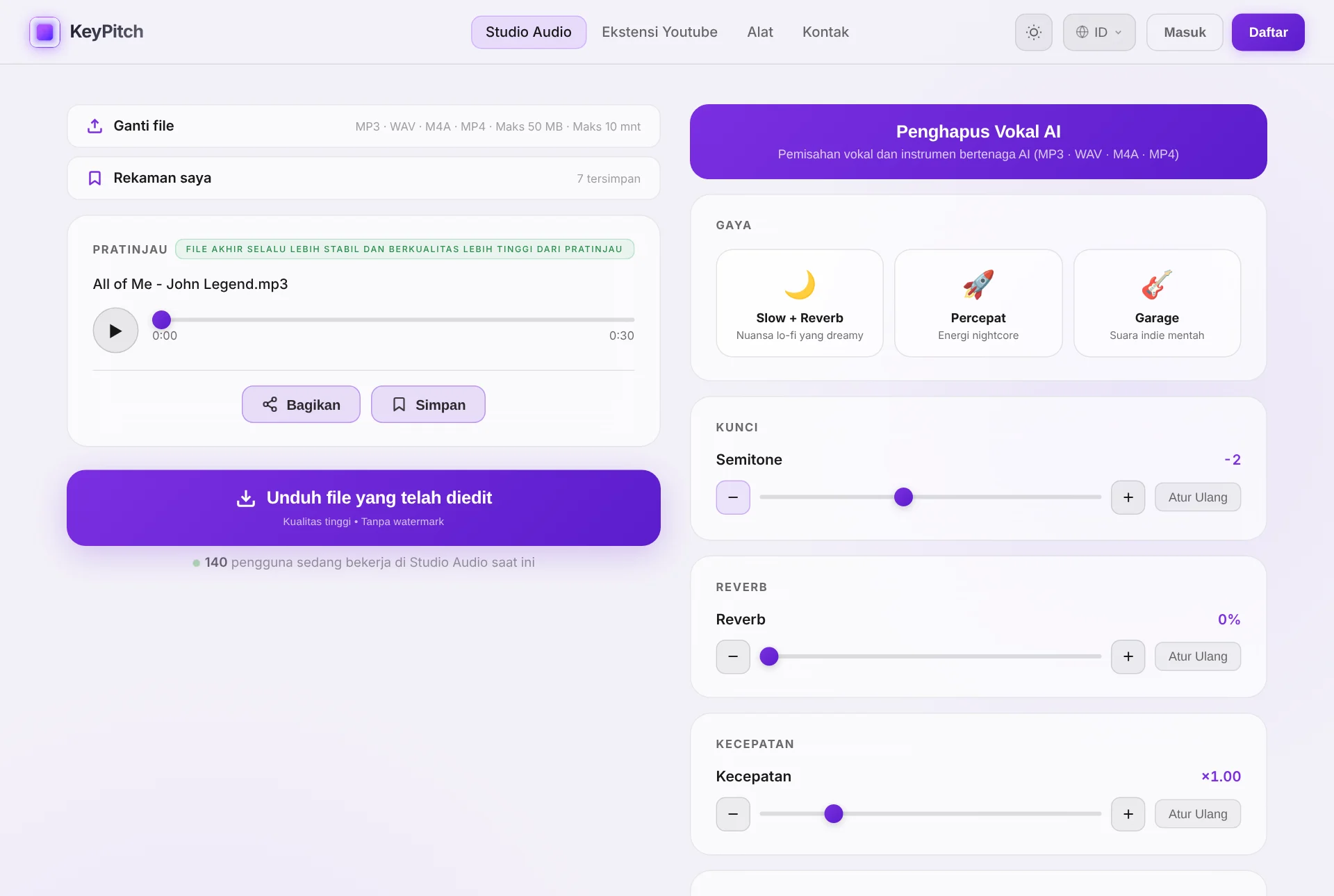
Bagikan trek dengan satu tautan — berlaku 7 hari
Klik Bagikan dan Studio memberi Anda sebuah tautan. Murid Anda membukanya dan langsung mendapati file Anda persis, dengan pengaturan Anda persis — kunci yang Anda temukan bersama, tempo, efek. Tanpa lampiran, tanpa akun, tanpa instalasi. Membuat, mengirim, dan membuka tautan gratis, dan setiap tautan berlaku 7 hari.
Dan ini berlaku dua arah. Sebelum pelajaran, murid memuat lagu yang ingin ia latih, mengaturnya sesuai cara ia menyanyikannya, lalu mengirimkan tautannya: Anda membuka lagunya dengan 1 klik, dan pelajaran dimulai dengan materi yang tepat.
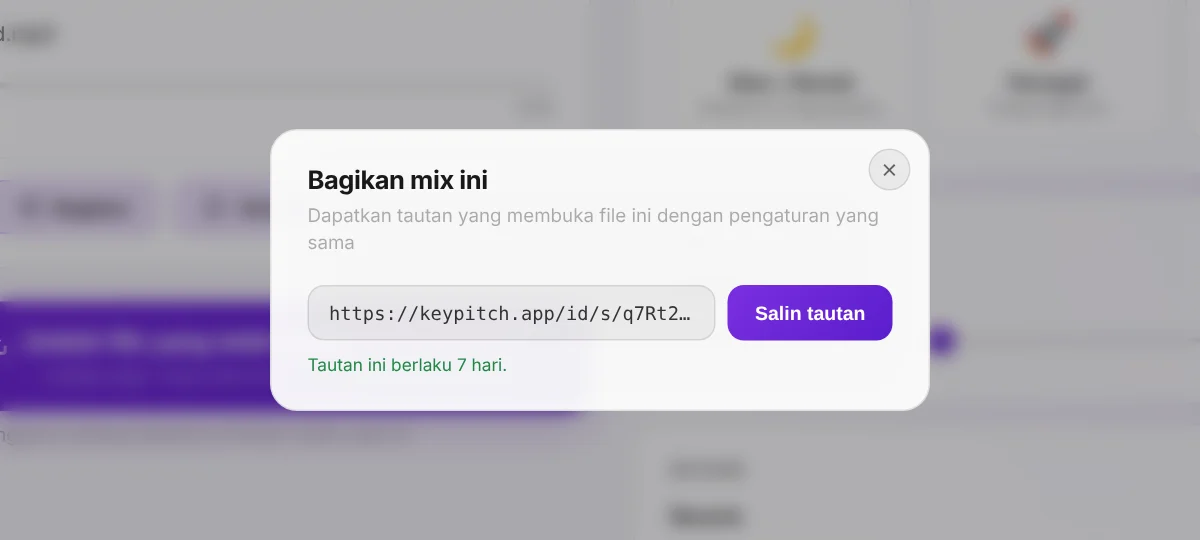
Pustaka dengan satu folder per murid
Setiap trek yang Anda siapkan bisa disimpan di Rekaman saya beserta pengaturannya. Buat satu folder per murid, beri nama sesuai murid itu, dan seret setiap lagu ke dalamnya: di pelajaran berikutnya, seluruh repertoarnya — setiap lagu sudah di kuncinya — hanya 1 klik. Anda bahkan bisa membagikan trek yang tersimpan langsung dari pustaka. Kini Anda juga bisa menyimpan loop A/B: hanya bagian yang sedang dilatih murid, yang terbuka lagi di Mode latihan beserta pengaturannya.
Tanpa akun Anda menyimpan 3 rekaman di tab yang sedang terbuka; akun gratis menyimpan 3 selamanya, di komputer mana pun; langganan membuat rekaman dan folder tanpa batas.
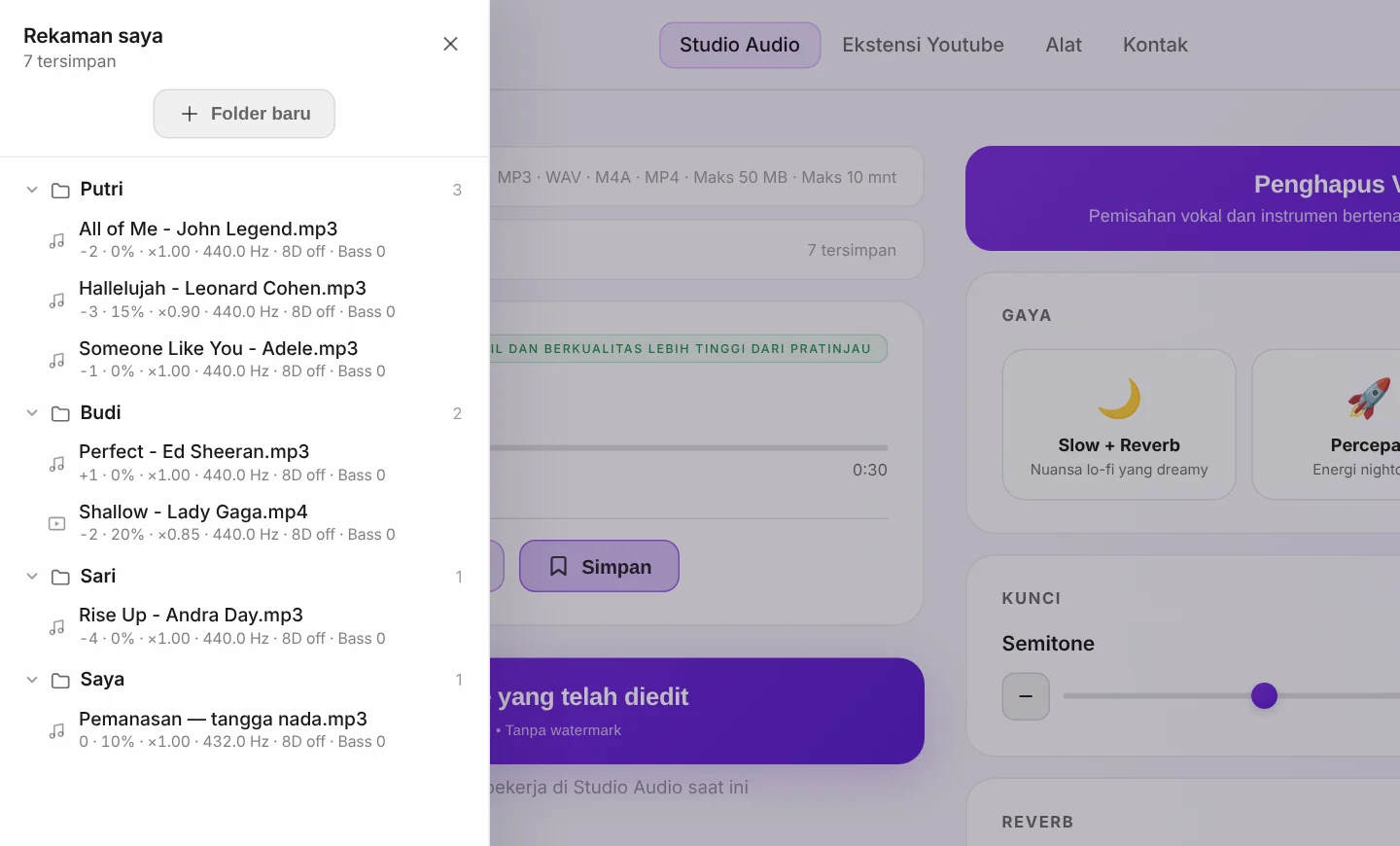
Mode latihan: seluruh pelajaran dalam satu layar
Di komputer, nyalakan Mode latihan di pemutar dan Studio Audio menjadi satu layar tanpa perlu menggulir — bahkan bilah navigasi pun menghilang, agar tampilan lebih bersih. Dengan video karaoke, gambar mengisi sebagian besar layar sehingga murid Anda membaca lirik dengan nyaman. Dengan file audio, panel Lirik menggantikannya: tempel liriknya lalu atur ukuran teks dengan − dan + — lirik itu masih ada saat Anda membuka lagu tersebut lagi.
Semua pengaturan tetap dalam jangkauan di kanan, di bawah loop A/B yang mengulang persis frasa yang sedang dilatih: Tanpa henti berputar sampai frasanya pas, Sekali memutarnya satu kali lalu menunggu di A dalam keadaan jeda, agar murid menyanyikannya kembali sendiri. Mode latihan gratis selama 5 menit per hari, dan tanpa batas dengan langganan.
- Latih frasa yang sulit — pasang A dan B di sekelilingnya dan biarkan berulang selama murid bernyanyi.
- Tanya jawab — dalam mode Sekali, trek memutar frasa satu kali lalu menunggu murid menjawab.
- Lirik yang bisa dibaca semua orang — di layar besar atau proyektor, teksnya terbaca dari belakang ruangan.
Analisis lagu: ketahui kuncinya sebelum mengubahnya
Setiap file yang Anda muat di Studio Audio dianalisis di browser Anda. Klik tombol ⓘ di bawah pemutar untuk membaca kunci, kunci relatif, kode Camelot, dan tempo-nya — dan saat Anda menggeser semitone, panel menampilkan kunci baru: dari A minor, −2 menjadi G minor. Praktis untuk menulis kunci di partitur murid atau memberitahu pengiring. Kini pemutar punya kembali ke awal, −5 dtk, dan +5 dtk, jadi Anda kembali ke frasa itu dengan sekali klik.
Alur kerja ideal untuk pelajaran menyanyi
Inilah metode persis yang diandalkan oleh para guru vokal paling sukses:
- Sebelum pelajaran, murid mengirimkan lagu yang ingin ia latih — tautan Bagikan dari Audio Studio, atau filenya langsung (MP3, MP4, M4A, atau WAV).
- Saat pelajaran, buka di Audio Studio dan geser parameternya — terutama semitone — sampai lagu cocok dengan jangkauan vokalnya.
- Setelah menemukan kunci yang tepat, simpan di folder murid dan kirimkan kembali: tautan Bagikan untuk langsung berlatih, atau file unduhan untuk berlatih di rumah secara offline, tanpa koneksi internet.
Langganannya sangat terjangkau dan, terus terang, sangat menguntungkan: balik modal setelah sekitar lima unduhan. Setelah itu Anda mendapat unduhan tanpa batas untuk trek yang diedit, pemisahan vokal AI tanpa batas, Mode latihan tanpa batas, dan pustaka tanpa batas — semua yang dibutuhkan studio mengajar yang sibuk.
Satu ekosistem untuk setiap momen pelajaran
Kebanyakan guru harus berpindah-pindah antara tab YouTube, editor audio, layanan kirim file, dan buku catatan transposisi. KeyPitch menggantikan seluruh rangkaian itu dengan dua alat yang berbicara dalam bahasa yang sama:
- Secara langsung, di YouTube — ekstensi gratis mengubah kunci, pitch, dan kecepatan secara real-time, dan pustakanya selalu menyiapkan lagu-lagu setiap murid.
- Dengan file Anda sendiri — Audio Studio mentransposisi, memperlambat, menambah efek, dan memisahkan vokal dari instrumental.
- Di antara pelajaran — tautan Bagikan membawa trek beserta pengaturannya ke murid Anda, dan membawa milik mereka kembali kepada Anda.
- Sepanjang tahun — kedua pustaka menyimpan setiap lagu setiap murid, tertata dalam folder, hanya 1 klik.
Itulah sebabnya KeyPitch terus menyebar dari satu studio mengajar ke studio lainnya: 19700+ musisi, penyanyi, pelatih vokal, guru menyanyi, dan murid sudah menggunakannya. Cukup lengkap untuk satu studio mengajar penuh, dan cukup sederhana untuk dipakai murid sendirian di rumah.
Mengapa ini sangat ampuh untuk pelajaran vokal
- Setiap murid di nadanya sendiri — sopran, bariton, dan suara remaja yang sedang berubah semuanya berlatih dengan nyaman, tanpa Anda perlu merekam ulang apa pun.
- Tidak ada lagi paksaan — turunkan lagu beberapa semitone agar pitch tinggi terjangkau, atau naikkan untuk memperluas jangkauan dengan aman.
- Latihan tahan offline — file yang diekspor bisa diputar di mana saja, jadi koneksi yang putus atau jeda iklan tidak pernah mengganggu latihan.
- Karaoke sesuai permintaan — hapus vokal utama untuk memberi murid instrumental bersih di nada yang persis tepat.
- Tak perlu mengatur dua kali — kedua pustaka mengingat setiap pengaturan, jadi lagu yang disiapkan sekali siap di setiap pelajaran.
- Tak ada yang hilang di kotak masuk — tautan Bagikan membuka file yang tepat dengan pengaturan yang tepat, untuk Anda dan murid Anda.
- Bagian sulit diulang terus — loop A/B di Mode latihan memutar ulang sebuah frasa tanpa ada yang menyentuh bilah.
Siap menyesuaikan setiap lagu untuk setiap murid? Tambahkan ekstensi KeyPitch gratis untuk pelajaran langsung, dan gunakan Audio Studio untuk menyiapkan, membagikan, dan menata trek latihan yang bisa mereka simpan.
Pertanyaan yang Sering Diajukan
Secara gratis, alat terbaik adalah ekstensi Chrome KeyPitch. Ia mengubah nada video YouTube atau YouTube Music apa pun secara real-time, sehingga murid bisa menurunkan atau menaikkan backing track sesuai jangkauan vokalnya sambil bernyanyi. 100% gratis tanpa perlu mengunduh apa pun. Untuk trek latihan yang tersimpan dan offline, padukan dengan KeyPitch Audio Studio.
Naikkan atau turunkan lagu dalam semitone sampai pitch tertinggi dan terendah terasa nyaman di jangkauan murid Anda. Dengan ekstensi KeyPitch gratis Anda melakukannya secara langsung di YouTube; dengan KeyPitch Audio Studio Anda mengunggah file, menyetel slider semitone sampai pas, lalu mengunduh hasilnya untuk dikirim ke murid.
Bisa. Pasang ekstensi Chrome KeyPitch gratis, buka video karaoke atau backing, lalu geser slider semitone. Nadanya berubah seketika sementara video terus berjalan pada kecepatan normal, sehingga Anda dan murid bisa menemukan nada yang tepat bersama dalam hitungan detik.
Metode yang dipakai kebanyakan guru menyanyi yang sukses: minta murid mengirimkan lagu sebelum pelajaran — tautan Bagikan KeyPitch atau file MP3, MP4, M4A, atau WAV. Saat pelajaran, buka di KeyPitch Audio Studio dan atur semitone sampai cocok dengan jangkauannya, lalu simpan di folder murid dan kirimkan kembali sebagai tautan Bagikan atau file unduhan. Ia berlatih di rumah dengan kunci yang sempurna.
Ada. Ekstensi KeyPitch sepenuhnya gratis, dan langganan KeyPitch Audio Studio sangat terjangkau — balik modal setelah sekitar lima kali unduh lalu memberi Anda unduhan tanpa batas untuk file yang diedit, penghapusan vokal AI tanpa batas, dan Mode latihan tanpa batas. Tidak ada yang perlu dipasang dan berjalan di browser mana pun.
Bisa. Guru yang ingin setiap murid memiliki akses Audio Studio sendiri dapat membeli lisensi untuk seluruh studio atau kelas mereka dengan harga per kursi yang lebih murah dan diskon besar. Hubungi kami melalui halaman kontak untuk harga sekolah dan studio.
Bisa. KeyPitch Audio Studio menyertakan AI Vocal Remover yang memisahkan trek menjadi vokal dan instrumental. Hapus vokal utama untuk membuat backing track karaoke, atau simpan hanya vokal sebagai acuan — lalu transpose ke jangkauan murid Anda dan unduh.
Tidak. Ekstensinya adalah add-on Chrome gratis yang langsung berfungsi di YouTube. Dari Audio Studio, tautan Bagikan membuka trek Anda tanpa akun dan tanpa instalasi, dan file hasil ekspor memungkinkan mereka berlatih di mana saja, tanpa koneksi internet.
Bisa. Di Studio Audio, klik Bagikan dan Anda mendapat tautan yang membuka lagu itu di studio dengan kunci dan pengaturan persis seperti yang Anda pilih. Kirim lewat email atau WhatsApp dan murid Anda cukup membukanya — tanpa akun, tanpa instalasi. Membuat, mengirim, dan menerima tautan gratis, dan masing-masing berlaku 7 hari. Ini juga berlaku sebaliknya: murid yang tersendat pada satu bagian bisa mengirimkan filenya sebelum kelas.
Bisa. Studio Audio punya pustaka pribadi dengan folder: beri nama satu folder untuk tiap murid dan simpan di dalamnya semua lagu yang sudah disetel ke jangkauan suaranya. Tanpa akun Anda menyimpan 3 rekaman di tab yang sedang terbuka, akun gratis menyimpan 3 selamanya di komputer mana pun, dan langganan membuat pustaka tanpa batas — yang pada akhirnya dibutuhkan oleh hampir semua studio pengajaran. Kini Anda juga bisa menyimpan loop A/B: hanya bagian yang sedang dilatih murid, yang terbuka lagi di Mode latihan beserta pengaturannya.
Ya. Simpan lagu YouTube apa pun beserta pengaturan persisnya — kunci, pitch, tempo, reverb, 8D — dan buka lagi dengan 1 klik. Tata lagu-lagu Anda dalam folder tanpa batas dengan seret dan lepas, misalnya satu folder per murid. Pustaka disimpan secara lokal di browser Anda, tanpa biaya, dan tetap ada setelah Anda menutup tab atau memulai ulang komputer. Kini pustaka itu juga menyimpan loop A/B, jadi Anda bisa menyimpan hanya bagian reff yang sedang dilatih murid.
Karena KeyPitch mencakup seluruh pelajaran dalam satu ekosistem sederhana: ekstensi gratis untuk kerja langsung di YouTube, Audio Studio untuk trek latihan dan pemisahan vokal AI, tautan Bagikan yang membuka trek dengan pengaturan persisnya, dan pustaka dengan satu folder per murid. Bisa dikuasai dalam hitungan menit — itulah sebabnya 19700+ musisi, guru, dan murid sudah menggunakannya.
Bisa. Di komputer, nyalakan Mode latihan di pemutar dan loop A/B akan muncul. Pasang titik A dan titik B dengan tombolnya, dengan tombol A dan B di keyboard, atau dengan menyeretnya di bilah. Tanpa henti mengulang bagian itu sampai pas; Sekali memutarnya satu kali lalu menunggu di A dalam keadaan jeda, agar murid menyanyikannya kembali. Dengan file audio, Anda juga bisa menempelkan lirik di sisi kiri layar. Simpan loop di Rekaman saya untuk membukanya lagi di pelajaran berikutnya. Mode latihan gratis selama 5 menit per hari, tanpa batas dengan langganan.
Bisa. Setiap file yang Anda muat di Studio Audio dianalisis di browser Anda. Klik tombol ⓘ di bawah pemutar untuk melihat kunci, kunci relatif, kode Camelot, kemungkinan kedua, dan tempo. Geser slider semitone dan kunci barunya ditampilkan, jadi Anda selalu tahu murid Anda bernyanyi di kunci apa. Gratis.
Mode Studio membuka ekstensi gratis di panel samping Chrome, tepat di sebelah video YouTube, yang beralih ke mode bioskop: video di kiri, semua kontrol di kanan. Ada tiga tab — Kontrol, dengan equalizer 10 band dan 6 preset termasuk Vocal Boost; Perpustakaan, yang menyimpan lagu dan loop A/B; dan Ruang saya, tempat murid memantau streak dan waktu latihan mereka untuk membangun rutinitas yang sesungguhnya di antara pelajaran. Semuanya gratis.