Cara Menemukan Kunci yang Tepat untuk Karaoke: Nyanyikan Lagu Apa Saja dengan Nyaman
Anda memilih lagu karaoke yang Anda sukai, mengambil mic, dan kemudian terjadi: verse terlalu rendah untuk suara Anda, chorus sangat tinggi, dan akhirnya Anda memaksakan setiap nada. Bukan berarti Anda tidak bisa menyanyi. Lagunya saja yang tidak berada di kunci yang tepat untuk suara Anda.
Kenyataannya, sebagian besar track karaoke diatur dalam kunci artis aslinya. Tapi setiap penyanyi memiliki jangkauan vokal yang berbeda. Yang cocok untuk Adele atau Freddie Mercury mungkin tidak cocok untuk Anda. Kabar baiknya? Anda bisa menyanyikan semua lagu yang pernah ditulis — Anda hanya perlu mengubah kunci instrumental agar sesuai dengan suara Anda.
Panduan ini menjelaskan cara melakukannya, baik saat karaoke di YouTube maupun dengan file audio Anda sendiri.
Mengapa Kebanyakan Penampilan Karaoke Terdengar Kurang Bagus
Ketika track karaoke berada di kunci yang tidak cocok dengan suara Anda, beberapa masalah muncul:
- Ketegangan tenggorokan dan kelelahan vokal — Mencapai nada di luar jangkauan nyaman Anda membuat pita suara tegang. Sepanjang satu lagu, ini menyebabkan suara serak, pecah, dan ketidaknyamanan nyata.
- Menyanyi fals — Ketika melodi berada di ujung jangkauan Anda, akurasi nada menurun. Anda terdengar "fals" meskipun Anda tahu melodi dengan sempurna.
- Kehilangan warna suara dan kekuatan — Suara Anda terdengar paling baik dalam jangkauan tertentu. Di luar zona itu, Anda kehilangan kekayaan dan proyeksi yang membuat nyanyian terdengar bagus.
- Kurang percaya diri — Berjuang dengan lagu membuat Anda menahan diri alih-alih bernyanyi dengan bebas. Kesenangan karaoke hilang.
Tidak ada masalah ini yang berarti suara Anda jelek. Masalahnya adalah kuncinya yang salah.
Apa Itu Jangkauan Vokal dan Mengapa Penting?
Jangkauan vokal Anda (juga disebut tessitura) adalah kumpulan nada yang bisa Anda nyanyikan dengan nyaman, dengan warna suara dan kontrol yang baik. Setiap suara berbeda — bass secara alami lebih rendah dari tenor, alto lebih rendah dari soprano. Bahkan dalam tipe suara yang sama, jangkauan individu berbeda-beda.
Penyanyi profesional mengetahui jangkauan mereka dan memilih kunci yang sesuai. Di studio, produser mengatur kunci untuk artis. Tapi di karaoke, track terkunci di kunci rekaman asli, yang dipilih untuk suara orang lain.
Poin penting: Anda tidak perlu mengubah suara untuk menyesuaikan lagu. Anda perlu mengubah kunci lagu untuk menyesuaikan suara Anda. Itulah yang disebut transposisi.
Cara Kerja Perubahan Kunci: Penjelasan Semitone
Dalam musik, langkah terkecil antara dua nada disebut semitone (atau setengah nada). Ini adalah jarak antara dua tuts piano yang berdekatan, termasuk tuts hitam.
Ketika Anda "mengubah kunci" track karaoke, Anda menggeser setiap nada instrumental ke atas atau ke bawah sejumlah semitone. Lagunya tetap sama — melodi sama, akor sama, tempo sama — tapi seluruh track bergerak lebih tinggi atau lebih rendah agar sesuai dengan suara Anda.
- +1 semitone = setengah nada ke atas (sedikit lebih tinggi)
- -1 semitone = setengah nada ke bawah (sedikit lebih rendah)
- +2 semitone = satu nada penuh ke atas
- -3 semitone = terts minor ke bawah
Kebanyakan penyanyi perlu menggeser antara -4 dan +4 semitone untuk menemukan kunci yang nyaman. Lebih dari itu, track bisa mulai terdengar tidak natural, meskipun algoritma pitch-shifting modern menangani pergeseran yang lebih besar dengan bersih.
Metode 1: Ubah Kunci Karaoke Langsung di YouTube
Jika Anda berkaraoke langsung di YouTube — seperti jutaan orang — Anda bisa mengubah kunci video apa pun secara real time tanpa meninggalkan halaman.
Cara melakukannya dengan Ekstensi Chrome KeyPitch
- Install ekstensi KeyPitch dari Chrome Web Store. Gratis dan hanya butuh 5 detik.
- Buka video karaoke apa pun di YouTube — cari lagu Anda + "karaoke" atau "instrumental".
- Mulai menyanyi di kunci asli dengan suara alami Anda. Jangan memaksakan. Perhatikan saja di mana terasa tidak nyaman.
- Gunakan slider Semitone untuk menggeser kunci ke atas atau ke bawah. Geser satu semitone pada satu waktu. Perubahannya instan — Anda akan mendengar instrumental berubah secara real time sementara video terus diputar.
- Terus sesuaikan sampai lagu berada di zona nyaman Anda — jangkauan di mana suara Anda terdengar penuh, terasa ringan, dan Anda bisa mencapai setiap nada tanpa memaksakan.
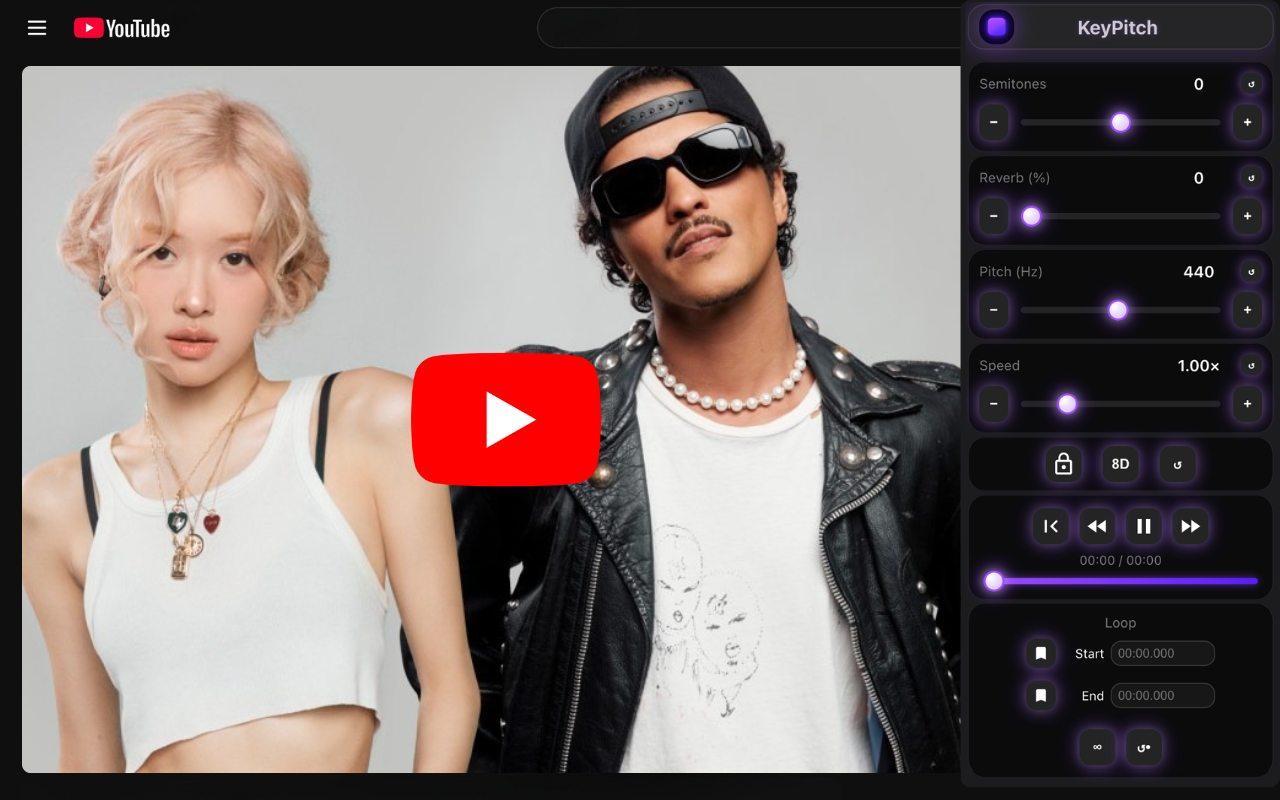
Ekstensi ini juga menawarkan kontrol kecepatan, reverb, dan efek audio lainnya — Anda bisa memperlambat lagu cepat untuk latihan atau menambahkan reverb untuk nuansa karaoke yang lebih profesional. Dan di Mode Studio, KeyPitch terbuka di panel samping di sebelah video, dalam mode bioskop, dengan equalizer 10 band — lirik tetap besar dan Anda bisa membuat backing track lebih menonjol.
Metode 2: Gunakan File Audio Anda Sendiri di KeyPitch Audio Studio
Jika Anda memiliki instrumental karaoke sendiri — backing track yang didownload, beat khusus, atau rekaman — Anda bisa menguploadnya langsung ke KeyPitch Audio Studio dan menyesuaikan kunci di sana.
Cara kerjanya
- Kunjungi keypitch.app dan upload file audio atau video Anda (MP3, WAV, M4A, atau MP4).
- Gunakan slider Semitone untuk menggeser kunci, sama seperti di ekstensi. Preview perubahan secara real time.
- Sempurnakan dengan efek tambahan. Audio Studio memberi Anda akses ke alat yang tidak akan Anda temukan di aplikasi karaoke biasa:
- Reverb — menambahkan ruang dan kedalaman pada track karaoke Anda, membuatnya terdengar lebih profesional
- 8D Audio — menciptakan suara spasial dan imersif yang bergerak di sekitar Anda
- Equalizer 10 band — enam preset sekali klik (Bass, Vokal, Treble, Hangat, Cerah, Loudness) untuk memberi instrumental bobot, kehangatan, atau kilau
- Kontrol kecepatan — perlambat lagu cepat untuk latihan atau percepat untuk tantangan
- Berlatih di Mode latihan. Di komputer, nyalakan Mode latihan di pemutar: video karaoke mengisi layar sehingga lirik mudah dibaca, pengaturan tersusun di kanan, dan loop A/B mengulang reff sampai Anda menguasainya. Tombol ⓘ juga menampilkan kunci dan tempo trek. Bilah navigasi menghilang agar layar lebih bersih, dan loop reff bisa disimpan di Rekaman saya untuk lain kali. Mode latihan gratis selama 5 menit per hari, tanpa batas dengan langganan.
- Download track yang sudah disesuaikan — ekspor instrumental yang dimodifikasi dalam kualitas tinggi, siap untuk sesi karaoke Anda.
Cara Menemukan Kunci Ideal Anda: Pendekatan Praktis
Menemukan kunci yang nyaman tidak rumit. Berikut metode yang selalu berhasil:
- Mulai dengan kunci asli. Nyanyikan verse pertama dan chorus secara alami. Perhatikan bagaimana rasanya, bukan hanya bagaimana bunyinya.
- Identifikasi nada yang bermasalah. Apakah nada tinggi terlalu tinggi? Nada rendah terlalu rendah? Atau keduanya?
- Geser ke arah yang benar. Jika nada tinggi masalahnya, turunkan kunci (-1, -2, -3 semitone). Jika nada rendah masalahnya, naikkan (+1, +2, +3).
- Geser satu semitone pada satu waktu. Setiap semitone membuat perbedaan yang terasa. Coba nyanyikan bagian tersulit lagu di setiap langkah.
- Berhenti ketika pas. Kunci yang tepat terasa ringan. Suara Anda punya ruang untuk bernapas, melodi duduk secara alami di jangkauan Anda, dan Anda bisa fokus pada ekspresi alih-alih bertahan hidup.
Tips pro: Setelah menemukan kunci Anda untuk lagu tertentu, catat. Kebanyakan penyanyi menemukan bahwa mereka menggunakan offset yang sama (misalnya -2 semitone) untuk banyak lagu dengan gaya serupa, yang memberi Anda titik awal untuk track baru.
Penyesuaian Kunci Umum Berdasarkan Tipe Suara
Meskipun setiap suara unik, berikut titik awal umum saat menyanyikan lagu karaoke populer yang awalnya dinyanyikan oleh artis terkenal:
- Penyanyi pria menyanyikan artis wanita (misalnya Adele, Whitney Houston) — coba -4 sampai -6 semitone
- Penyanyi wanita menyanyikan artis pria (misalnya Frank Sinatra, Ed Sheeran) — coba +3 sampai +5 semitone
- Suara pria rendah (bass/bariton) menyanyikan tenor — coba -2 sampai -4 semitone
- Suara wanita tinggi (soprano) menyanyikan alto — coba +1 sampai +3 semitone
Ini adalah titik awal. Selalu sempurnakan dengan telinga — tujuannya adalah kenyamanan dan kualitas warna suara.
Mengapa KeyPitch Adalah Alat Terbaik untuk Mengubah Kunci Karaoke
Ada berbagai cara untuk mengubah kunci lagu, tapi kebanyakan punya kelemahan signifikan: software desktop lambat, kebanyakan aplikasi memerlukan download, dan pitch-shifter dasar menurunkan kualitas audio. KeyPitch menyelesaikan semua ini:
- Bekerja langsung di browser Anda — tidak perlu install software, tidak perlu akun untuk memulai
- Perubahan kunci real time — dengar hasilnya langsung saat menggeser slider
- Tidak ada perubahan kecepatan — tempo tetap sama saat mengubah kunci (tidak seperti alat dasar yang mempercepat atau memperlambat track)
- Bekerja di YouTube — ekstensi Chrome memungkinkan Anda mengubah kunci video karaoke YouTube mana pun tanpa mendownload apa pun
- Audio Studio untuk file Anda sendiri — upload MP3, WAV, M4A, atau MP4 dan akses perubahan kunci, reverb, 8D audio, equalizer 10 band, kontrol kecepatan, dan lainnya
- AI Penghapus Vokal — butuh versi karaoke yang tidak ada? Upload lagu asli dan biarkan KeyPitch memisahkan vokal dari instrumental menggunakan AI, lalu sesuaikan kunci instrumental
- Ekspor kualitas tinggi — download track yang sudah ditransposisi tanpa kehilangan kualitas
- Mode latihan untuk karaoke — di komputer, video memenuhi layar sehingga lirik mudah dibaca, dengan kunci, kecepatan, dan reverb di kanan serta loop A/B untuk melatih reff, tanpa bilah navigasi yang mengganggu
- Analisis kunci dan tempo — tombol ⓘ menampilkan kunci asli trek, dan kunci baru saat Anda mentranspos
Pertanyaan yang Sering Diajukan
Mulai menyanyi di kunci asli dengan suara alami Anda. Jika nada tinggi terasa tegang atau nada rendah terdengar lemah, ubah kunci menggunakan slider semitone. Geser satu semitone pada satu waktu sampai melodi duduk nyaman di jangkauan Anda. KeyPitch memungkinkan Anda melakukan ini secara real time di YouTube atau dengan file audio Anda sendiri.
Ya. Install ekstensi Chrome KeyPitch, buka video karaoke apa pun di YouTube, dan gunakan slider semitone untuk menggeser kunci ke atas atau ke bawah secara instan. Perubahan terjadi secara real time saat video diputar — tidak perlu mendownload apa pun.
Semitone adalah interval terkecil dalam musik Barat — jarak antara dua tuts piano yang berdekatan. Ketika Anda menggeser track karaoke +1 atau -1 semitone, Anda menaikkan atau menurunkan setiap nada setengah langkah. Ini memungkinkan Anda menyesuaikan instrumental dengan jangkauan vokal Anda tanpa mengubah tempo atau ritme.
Tentu saja. Setiap lagu bisa disesuaikan dengan suara Anda dengan mentransposisi instrumental ke kunci yang sesuai dengan jangkauan Anda. Tidak ada lagu yang "mustahil" untuk dinyanyikan — Anda hanya perlu menemukan kunci yang tepat. KeyPitch memungkinkan Anda menggeser kunci track apa pun sebanyak semitone yang diperlukan.
Tidak dengan KeyPitch. Alat audio dasar terkadang menghubungkan nada dan kecepatan, membuat lagu terdengar seperti chipmunk atau slow motion. KeyPitch menggunakan pitch-shifting profesional yang mengubah kunci sambil mempertahankan tempo asli.
Upload lagu asli (dengan vokal) ke KeyPitch Audio Studio dan gunakan AI Penghapus Vokal untuk memisahkan vokal dari instrumental. Kemudian sesuaikan kunci track instrumental yang dihasilkan agar sesuai dengan suara Anda. Anda baru saja membuat versi karaoke khusus dalam kunci sempurna Anda.
Bisa. Muat trek karaoke Anda di Studio Audio KeyPitch di komputer dan nyalakan Mode latihan: video mengisi sebagian besar layar, pengaturan pindah ke kanan, dan loop A/B mengulang bagian yang Anda pilih — Tanpa henti agar terus berputar, Sekali untuk mendengarnya satu kali lalu menyanyikannya kembali. Dengan file audio, tempel liriknya dan perbesar sesuka Anda. Simpan loop di Rekaman saya untuk kembali ke reff lain kali. Mode latihan gratis selama 5 menit per hari, tanpa batas dengan langganan.