The Free YouTube Extension for Musicians & Singers
Transpose, pitch shift, control speed, add reverb, enable 8D audio and create loops — all in real time on YouTube & YouTube Music. 100% free, no in-app purchases.
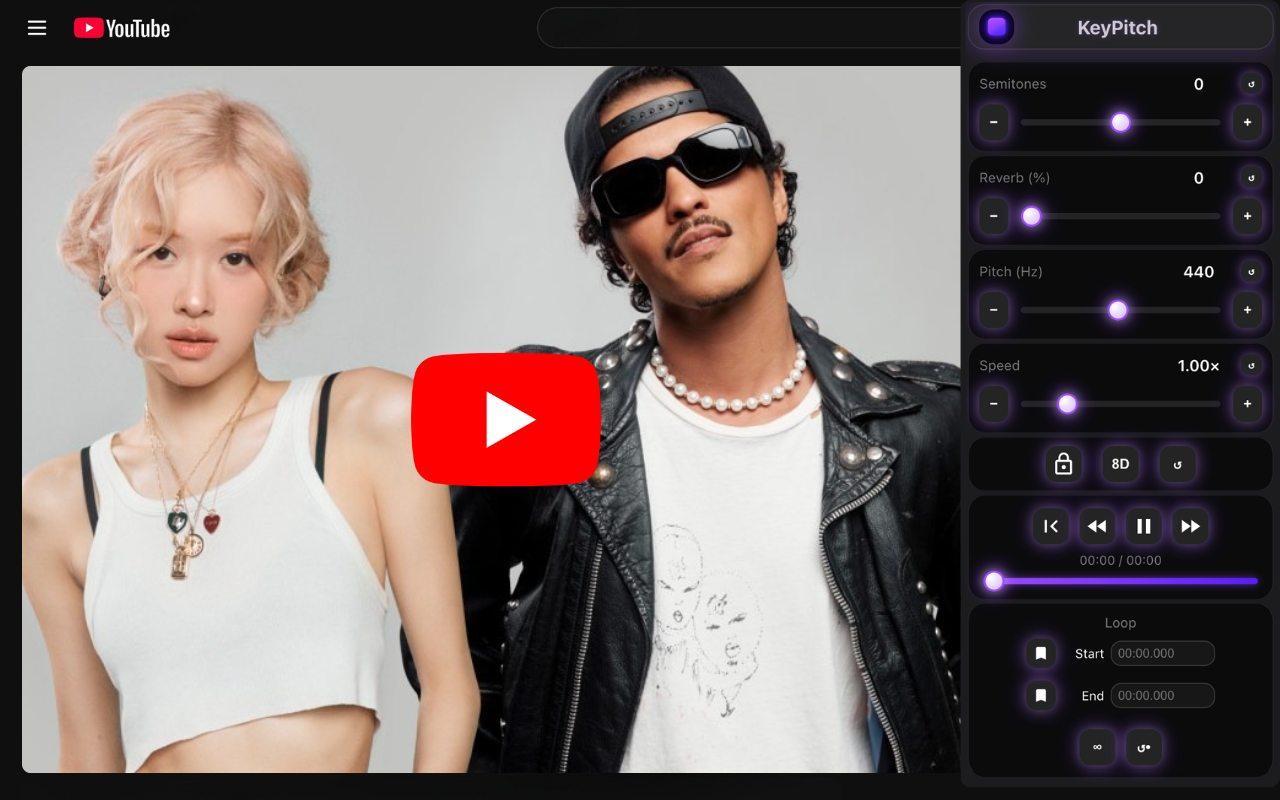
Screenshot of the KeyPitch extension on YouTube
How to Install KeyPitch
Get started in under 30 seconds. Works on Chrome, Edge, Brave, Opera, and all Chromium-based browsers.
Click "Install on Your Browser"
Visit the Chrome Web Store page and click the install button. The extension is 100% free with no in-app purchases.
Pin the Extension
Click the puzzle icon in your browser toolbar and pin KeyPitch for quick access whenever you're on YouTube.
Open YouTube & Start Transforming
Play any video on YouTube or YouTube Music, click the KeyPitch icon, and start transposing, shifting pitch, controlling speed, adding reverb, and more — all in real time.
Everything You Need, Right Inside YouTube
KeyPitch gives you professional pitch and speed controls directly in your browser. No downloads, no subscriptions.
Transpose by Semitone
Shift the key from -12 to +12 semitones in real time. Instantly adapt any YouTube song to your vocal range or instrument tuning.
Precision Pitch Shift (Hz)
Fine-tune pitch from 415.3 Hz to 476.2 Hz with 0.1 Hz precision. Perfect for matching instrumental tracks or concert pitch standards.
Speed Control
Adjust playback speed from x0.25 to x4 without affecting pitch. Slow down fast guitar solos or speed up practice sessions.
Reverb (0–100%)
Add reverb from 0% to 100% with 1% precision. Create a concert-hall sound that adds depth and warmth to any dry track.
8D Audio
Enable 8D spatial audio that swirls sound around your head. An immersive listening experience with any pair of headphones.
Loop Control
Create infinite or one-time loops on any section. Isolate a chorus, verse, or riff to practice it over and over until you nail it.
Customizable Workspace
Rearrange module cards in any order. Place the tools you use most at the top for a workflow that fits the way you work.
Built-in Audio Player
Play, pause, restart, seek with a timeline bar, and skip forward or backward 5 seconds — all without leaving the extension.
Who Is KeyPitch For?
Used daily by thousands of musicians, singers, and music teachers around the world.
Singers & Vocalists
Transpose any YouTube karaoke track or backing track into the perfect key for your vocal range. Whether you need a lower key or a higher key, KeyPitch lets you shift by semitones in real time so you can sing comfortably without straining. Hundreds of karaoke venues and vocal coaches rely on KeyPitch every day for pitch-perfect performances.
Music Teachers & Voice Coaches
Adapt songs for students of all ages and voice types. Teaching younger students who need higher keys? Transpose instantly. A voice teacher shared that nearly all songs needed to be shifted higher for their younger students — KeyPitch made it effortless, and now every student uses it to practice at home.
Guitarists & Instrumentalists
Slow down a blazing guitar solo with speed control while keeping the pitch stable — essential for learning complex passages note by note. Use loop control to section off a tricky riff and repeat it until muscle memory kicks in. Transpose to match alternate tunings or capo positions without re-tuning your guitar.
Pianists & Keyboard Players
Transpose YouTube songs to practice chord progressions in any key. Loop a specific section to work on timing and dynamics. Hundreds of pianists use KeyPitch daily to transpose songs and slow them down for sight-reading practice.
Music Producers & Beatmakers
Preview pitch-shifted samples directly on YouTube before importing into your DAW. Use the Hz-level precision to match reference tracks. Create slow + reverb edits or TikTok speed-up previews in seconds to test creative ideas instantly.
Casual Listeners & Audio Enthusiasts
Love slow + reverb edits? Create them live by reducing speed and adding reverb. Want TikTok-style speed-ups? Just increase the speed. Turn on 8D audio for an immersive spatial experience. Add reverb for a concert-like feel that brings depth and warmth to any song.
What Users Are Saying
The highest-rated key-changing and pitch-shifting extension on the Chrome Web Store.
"I use KeyPitch every day to transpose songs into a lower key for karaoke. The semitone slider is incredibly accurate."
"The pitch shift in hertz is perfect for matching instrumental tracks to my voice. It's the best key-changing extension I've used."
"Reverb plus 8D audio makes every YouTube backing track sound like a live performance. Amazing tool for vocal training."
"I looped tiny sections of songs to practice riffs. KeyPitch has the cleanest loop control I've ever used."
"Being able to slow down YouTube music while keeping the pitch stable is essential for musicians. KeyPitch does it flawlessly."
"KeyPitch is now part of all my karaoke sessions. I transpose every song into the perfect key instantly."
"The key-changing and pitch-shifting tools work instantly. Perfect for adjusting YouTube instrumentals."
"I needed the fastest way to transpose YouTube songs for chord practice. KeyPitch's key controls are exactly what I needed."
"I teach singing to young students and almost every song needs to be shifted to a higher key. KeyPitch does this instantly. I showed it to all my students and now they use it at home to practice on their own."
"I create slow + reverb mixes on YouTube for fun. KeyPitch makes it so easy — just reduce speed, crank up the reverb, and the vibe is perfect."
Ready to Transform Your YouTube Experience?
Join 5,000+ musicians, singers, and music lovers who use KeyPitch every day.
Install on Your BrowserFrequently Asked Questions
Everything you need to know about KeyPitch.
Go to the Chrome Web Store, click "Add to Chrome", then pin KeyPitch in your toolbar. Open any YouTube video and click the KeyPitch icon to start.
Open KeyPitch on any YouTube video and use the Semitones slider to shift from -12 to +12 semitones. The key changes instantly in real time while the video keeps playing.
Use the Pitch (Hz) slider in KeyPitch to fine-tune from 415.3 Hz to 466.2 Hz with 0.1 Hz precision. This lets you match any reference pitch or adjust to your exact vocal frequency.
Use the Speed slider in KeyPitch to go from x0.25 to x4. Unlike YouTube's built-in speed control, KeyPitch keeps the pitch perfectly stable regardless of the speed you choose.
Click the 8D button in KeyPitch. The sound will rotate around your head in a spatial 3D effect. Use headphones for the best experience.
Set a start and end time in the Loop module. Choose infinite loop to repeat endlessly, or one-time loop to play the section once and continue. Perfect for practicing a chorus, verse, or solo.
Open a karaoke video on YouTube, launch KeyPitch, and move the Semitones slider to the left (e.g. -1, -2, -3). The track instantly plays in a lower key that suits your voice.
Open a karaoke video on YouTube, launch KeyPitch, and move the Semitones slider to the right (e.g. +1, +2, +3). The track instantly plays in a higher key adapted to your vocal range.
Use the Reverb slider in KeyPitch to add from 0% to 100% reverb in real time. It gives any track a concert-hall feel, adding depth and warmth to dry audio.