How to equalize a song online
- Upload your song or video — MP3, WAV, M4A or MP4, up to 50 MB and 10 minutes. It opens right in your browser.
- Press Play and pick a preset: Bass, Vocals, Treble, Warm, Bright or Loudness. The sound changes instantly, so you can compare them by ear.
- Fine-tune the ten bands, from 32 Hz to 16 kHz, up to 12 dB up or down. A double-click puts a band back to 0.
- Click Download: the Audio Studio opens with the same file and the same settings, ready to export as MP3, WAV, M4A or MP4.
What is an audio equalizer?
An equalizer — EQ for short — splits a sound into frequency bands and lets you turn each one up or down. The low bands carry the bass and the kick drum, the middle ones the voice and most instruments, the high ones the cymbals, the consonants and the air around them. Moving them changes the tone of a recording, never its notes, its key or its tempo.
This one has ten bands, an octave apart, from 32 Hz to 16 kHz — the layout of the graphic equalizers found on hi-fi systems and in studios. Each band goes from −12 to +12 dB, one decibel at a time, and a limiter at the end of the chain keeps a boost from clipping. It is the same equalizer as in the KeyPitch Audio Studio and the KeyPitch Chrome extension, filter for filter.
What each band does
- 32 and 64 Hz — sub-bass and bass. The rumble you feel more than you hear, and the weight of the kick drum and the bass guitar.
- 125 and 250 Hz — body and warmth. The fullness of the bass, of low voices and of the piano's left hand. Too much, and the mix turns muddy.
- 500 Hz and 1 kHz — the mids. The heart of voices, guitars and pianos. Too much sounds boxy or nasal, too little sounds hollow.
- 2 and 4 kHz — presence. Where a voice comes forward and the words become clear. Too much, and it turns harsh.
- 8 and 16 kHz — brilliance and air. Cymbals, the s and t of the lyrics, breaths, and the open top of a recording.
Six presets, and how they sound
We selected six presets that cover what musicians and singers reach for most often: Bass, Vocals, Treble, Warm, Bright and Loudness. Each one moves several bands at once, by a few decibels, in a way that is known to work — a starting point you can then adjust by hand.
Bass
Lifts 32 to 500 Hz, the most at 64 and 125 Hz (+4 dB). To the ear: more weight and punch — the kick hits harder, the bassline is easier to follow and the song feels bigger and fuller.
Vocals
Lowers the deep bass slightly and lifts 500 Hz to 8 kHz, the most at 2 kHz (+3 dB). To the ear: the singer steps forward, the words become clearer and the backing settles behind the voice.
Treble
Lifts 2 to 16 kHz, the most at 8 kHz (+4 dB). To the ear: crisper and more detailed — cymbals, strings, consonants and breaths stand out. On a recording that is already bright, it can tire the ear.
Warm
Gently lifts 32 to 500 Hz and softens 2 to 8 kHz. To the ear: rounder, softer, cosier — sharp edges are smoothed, a little like a vinyl record. Easy on the ears over a long practice session.
Bright
Trims 125 and 250 Hz and lifts 1 to 16 kHz, the most at 4 and 8 kHz (+3 dB). To the ear: open, airy and defined — the mud clears, as if a blanket had been lifted off the speakers.
Loudness
Lifts the lows and the highs and dips the mids around 1 kHz — the “smile” curve. To the ear: fuller and more vivid at low volume, where the ear hears bass and treble less than the mids.
An equalizer for singing and music teachers — and their students
This free online equalizer is ideal for singing teachers, vocal coaches, choir directors and music teachers. Before a lesson, Vocals brings the melody and the words of a song forward so a student can learn them by ear, Bass makes a bassline easy to follow, and Warm softens a harsh recording before it plays on the classroom speakers.
For students, it is a listening tool. Lift the voice to hear how the singer breathes and phrases, the treble to catch every consonant, the bass to find the root of each chord. Record yourself on your phone, and Bright clears away the muffled sound of the room so you can judge your diction and your tone.
In the Audio Studio, the same track then goes into the student's key and at a comfortable speed. Save it in My recordings, or send it with a Share link: the student opens the same file with the same equalizer settings.
Who equalizes, and what for
- A singing student switches on Vocals to learn the lyrics and the phrasing of a new song, then sings along.
- A vocal coach clears up a lesson recorded on a phone with Bright, then sends it to the student with a Share link.
- A choir director makes a muffled rehearsal recording clearer before sending it to the choir.
- A bassist lifts the low end with Bass to transcribe a line by ear; a drummer brings out the hi-hat with Treble.
- A pianist warms up a thin recital recording with Warm before sharing it with family.
- A musician practising late at night keeps the volume low and switches on Loudness to keep the bass and the sparkle.
- A video — a lesson, a recital, a cover filmed on a phone: the sound is equalized and the picture stays as it is.
Free, on audio and video files
The equalizer is free to use, with no account and no limit on the number of files. It works on audio files — MP3, WAV and M4A — and on MP4 videos, up to 50 MB and 10 minutes. On this page your file never leaves your device: it plays and is equalized inside your browser.
When it sounds right, Download takes the file and your ten bands to the KeyPitch Audio Studio, which exports it in the format you brought: an MP3 stays an MP3, and a video stays a video, picture untouched.
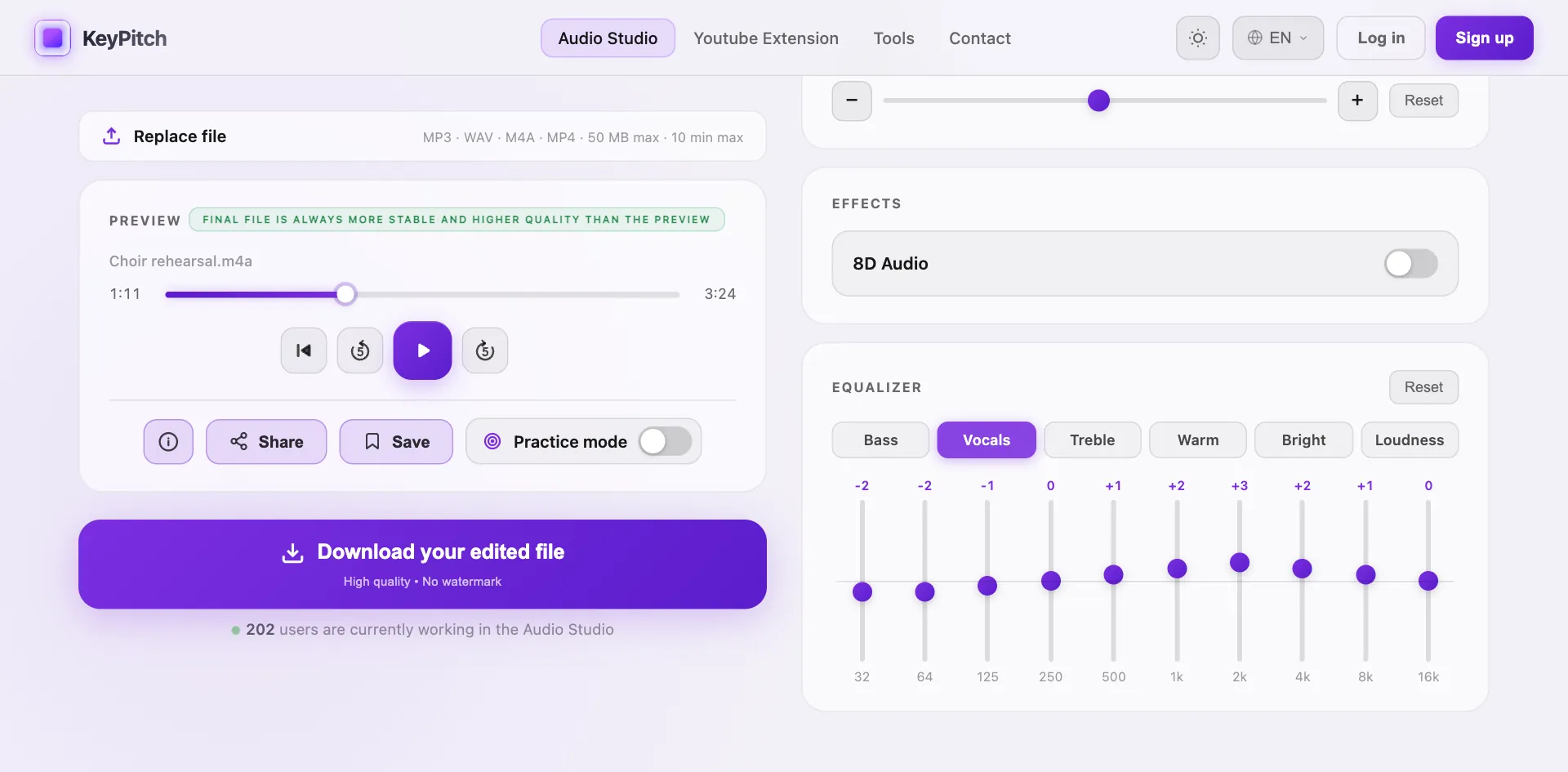
In the Audio Studio you can go further: transpose the key, change the speed without changing the pitch, add reverb or 8D audio, remove the vocals with AI and, on a computer, loop a passage from A to B in Practice mode.