One ecosystem to practise, teach and transform music
The Audio Studio, Practice mode, the YouTube extension and one-click tools work together and share the same features — all in your browser, with nothing to install.
Change the key, pitch and speed of any YouTube or YouTube Music video in real time — and with Studio mode, keep every control in a side panel right next to the video. Free, with no account.
Key in semitones, pitch in Hz and speed, live
A 10-band equalizer with 6 presets
A redesigned A/B loop, which you can save
A library with unlimited folders, stored on your computer
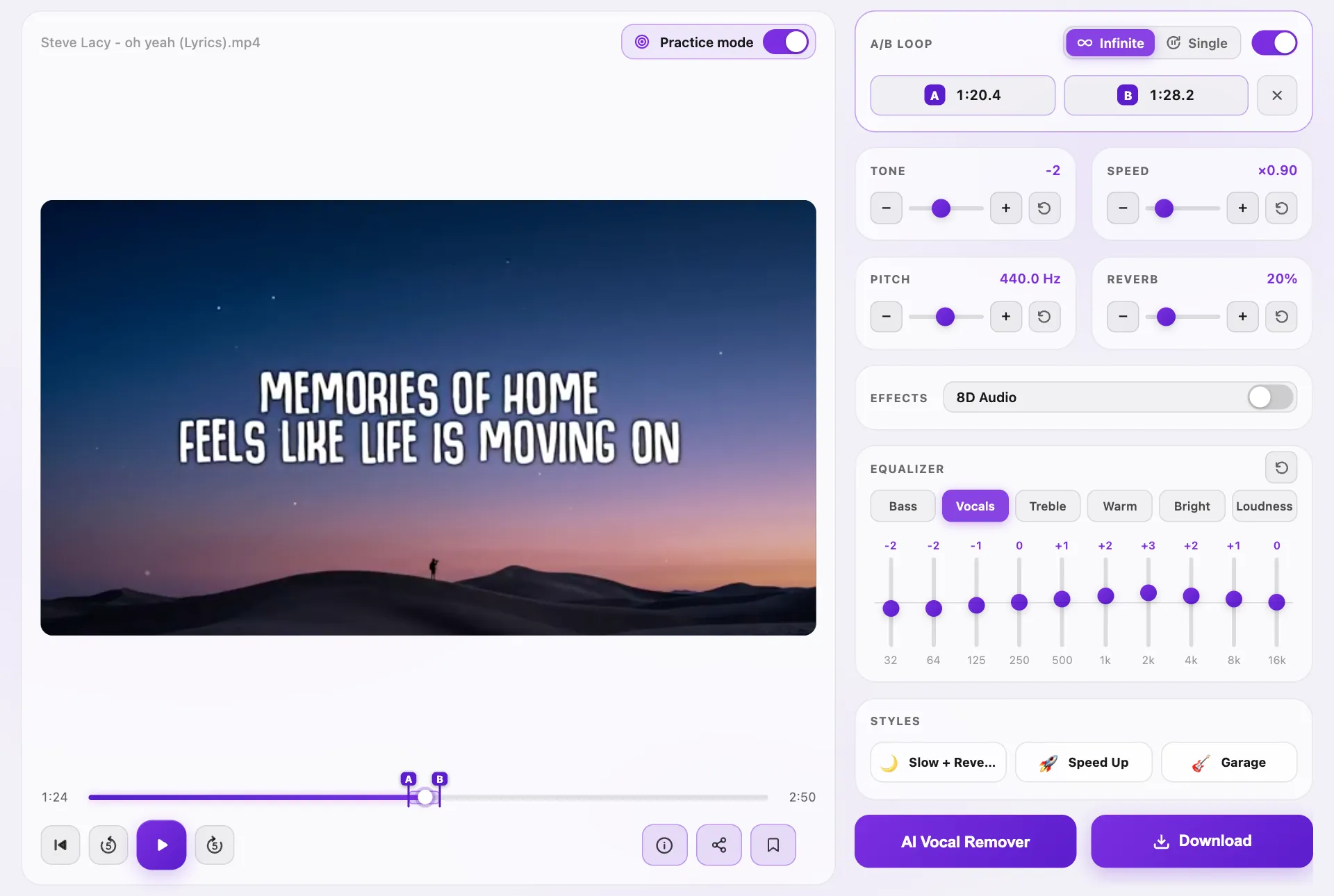
Switch on Practice mode in the player and the studio rearranges itself around what you are working on. Everything fits on one screen, with nothing to scroll. And the navigation bar steps aside, for a cleaner, calmer screen.
With a video, the picture takes the main part of the screen — big enough to read karaoke lyrics on the video, even from across the room.
With an audio file, a lyrics panel takes its place: paste the words of the song, then make the text bigger or smaller with − and +. The lyrics are kept in your browser for each song.
Every control on the right — key, pitch, speed, reverb, effects and the 10-band equalizer — more compact, and still one click away.
An A/B loop: mark point A and point B, then choose Infinite to repeat the passage again and again, or Single to play it once and go back to A, paused. Save the loop in My recordings and that passage comes back, with its settings, next time.
5 minutes a day for free — with a KeyPitch Pro subscription, Practice mode is unlimited.
Keyboard shortcuts: Space to play or pause, A and B to set the points, L to switch the loop on or off.
Practice mode
Lyrics
Aa
A/B Loop
A0:42B1:05
Semitones−2
Speed×0.85
Pitch440 Hz
Reverb20%
Effects8D Audio
Equalizer
BassVocalsTrebleWarmBrightLoudness
Styles
🌙Slow + Reverb🚀Speed Up🎸Garage
AI Vocal RemoverDownload
AB
Practice mode with a real lyric video: the video large on the left; on the right the A/B loop, key, speed, pitch, reverb, 8D audio, the equalizer and its presets, the styles, the AI Vocal Remover and Download.
Features
The features behind every tool
The same building blocks run through the whole ecosystem. Here is what each one does, and where to find it.
Transposer
Change the key by semitones, from −12 to +12, without touching the speed.
Audio StudioYouTube extensionOne-click tools
Pitch changer
Fine-tune the pitch in Hz, from 415.3 to 466.2 Hz — 432 Hz included.
Audio StudioYouTube extensionOne-click tools
Speed control
Slow a song down or speed it up without changing its pitch.
Audio StudioYouTube extensionOne-click tools
A/B loopNew
Repeat a passage between point A and point B, again and again or just once. Save it in My recordings in the Audio Studio, or in the extension's library.
Practice modeYouTube extension
Track analysisNew
The key, relative key, Camelot code, tempo and half/double-time of every file.
Audio StudioOne-click tools
AI vocal remover
Split a song into the isolated vocal and the instrumental.
Audio StudioOne-click tools
Effects
Reverb and 8D audio — plus one-tap styles such as Slowed + Reverb in the Audio Studio.
Audio StudioYouTube extensionOne-click tools
PlayerNew
Back to start, 5 seconds back or forward, and a bar you can click anywhere.
Audio Studio
Lyrics panel
Paste the words next to the controls and size them for your eyes — kept for each song.
Practice mode
Share links
Send a track with its exact settings, valid for 7 days — opening one is free.
Audio Studio
Library
Save songs with their settings and sort them into folders. A/B loops can be saved too — in My recordings as in the extension — to reopen just one passage.
Audio StudioYouTube extension
Export
Download the result as MP3, WAV or MP4, to use it offline.
Audio Studio
Studio modeNew
KeyPitch in Chrome's side panel, right next to the video, which switches to theater mode on its own.
YouTube extension
EqualizerNew
10 bands, from 32 Hz to 16 kHz, and 6 presets: Bass, Vocals, Treble, Warm, Bright and Loudness.
Audio StudioPractice modeYouTube extension
Practice statsNew
Current and longest streak, practice time, songs practised and active days, in My space.
YouTube extension
Custom workspace
Rearrange the cards in the order you like; the layout is remembered.
YouTube extension
Free or paid
Try everything for free. Pay only for what you keep.
For everyone
The Chrome extension, every feature included, with no in-app purchase
Uploading files, every setting and unlimited preview in the Audio Studio
Track analysis: key, tempo, Camelot code
The player, and Practice mode with its A/B loop for 5 minutes a day
Share links, to send and to receive
3 saved recordings, kept for good with a free account
When you need it
Download your edited file, one at a time or with a discounted pack
Subscription: unlimited downloads, unlimited AI vocal removal, unlimited Practice mode and an unlimited library
Licences for a whole teaching studio or class, at a reduced price per seat
Four tools that work together: the Audio Studio, an online studio for your own audio and video files; Practice mode, its one-screen layout for rehearsing on a computer; the free YouTube extension, which changes the key, pitch and speed of YouTube and YouTube Music videos live; and one-click tools such as the Key Finder and the BPM Finder. They share the same features: transposer, pitch changer, speed control, A/B loop, track analysis, AI vocal remover and effects. {userCount} people use them.
Track analysis and the player are free for everyone, with no account needed. Practice mode and its A/B loop are free for 5 minutes a day, and unlimited with a subscription; on YouTube, the extension's A/B loop is free. Otherwise, you only pay if you want to download your edited file.
Because its purpose is to show everything at once: the video or the lyrics on the left, every control and the A/B loop on the right. A phone screen has no room for two columns. The switch appears in the player on screens at least 1024 pixels wide, used with a mouse or a trackpad.
In Practice mode, set point A and point B at the playhead with the buttons or the A and B keys, or drag them along the bar. Infinite jumps back to A every time B is reached. Single plays the passage once, returns to A and waits there, paused, so you can sing or play it back. Save the loop in My recordings and you come back to exactly that passage, with its settings.
The analysis runs in your browser as soon as the file is loaded: it compares the notes played across the whole track with the 24 major and minor keys, and measures the beat. Click the ⓘ button under the player to see the key, the relative key, the Camelot code, the second most likely key, the tempo, the precise tempo and the half-time and double-time readings.
The extension, to work live on a YouTube video, for free. The Audio Studio, for your own files, when you want to export, separate the vocals, share or save a track. Practice mode, inside the studio on a computer, to rehearse with the video or the lyrics in front of you and an A/B loop. A one-click tool, when you need a single thing fast: the key, the BPM, a slowed + reverb version.
A new way to use the free extension: KeyPitch opens in Chrome's side panel, right next to the video, and YouTube switches to theater mode. It has three tabs — Controls, with a 10-band equalizer and the redesigned A/B loop; Library, which now saves loops as well as songs; and My space, which tracks your streaks and practice time. Not to be confused with the Audio Studio, which works on your own files.
Your next song, in your key, ready to practise
Load a file: its key, its tempo and Practice mode are waiting for you.