Tim Storme's Method: How France's #1 Vocal Coach Uses KeyPitch
If you have spent any time on TikTok, Instagram or YouTube, you have probably already seen him: Tim Storme, the music teacher from Lille, France, filmed mid-rehearsal — beaming with pride as a whole class of students lifts a song far higher than anyone expected. His videos have earned millions of followers and hundreds of millions of views, and made him the most famous singing teacher in France.
On February 11, 2026, Tim posted a video in which he showed his audience what he called, in his own words, “a revolutionary invention”: KeyPitch. He received nothing in return for talking about it — no sponsorship, no deal. He simply liked the tool and wanted his community to know about it. This article breaks down the method behind those choir videos, step by step, so you can use it with your own students today — for free.
In short: Tim's method is to find an instrumental or karaoke version of the song on YouTube, then use the free KeyPitch Chrome extension to change its key in semitones, live, until it fits his choir's voices. No download, no software, no account — just the right key, instantly.
Who is Tim Storme, the viral vocal coach from Lille?
Tim Storme is a music teacher who turned the everyday magic of a school choir into something the whole internet wanted to watch. What made his videos go viral was never a gimmick: it is the sound of ordinary students suddenly singing together beautifully, his obvious pride in them, and the genuinely moving moments when a class finds its voice. Behind that, though, is real craft — and a very practical problem he solves in every single rehearsal.
That problem is simple: a recorded song only exists in one key — the one the original artist sang it in. A choir does not. Depending on the age of the class, whether the young men's voices have already broken, and the overall range of the group, the original key is often too high or too low to sing comfortably. So before any class can sound great, the song has to be moved into the right key. That is exactly what KeyPitch let Tim do in front of the camera — and why he called it a revolutionary invention in his viral TikTok.
The method: change the key of a YouTube karaoke, live and for free
Every group of singers has its own comfortable range. A class of younger children, a choir that mixes voices that have changed with voices that have not, an adult ensemble — each one sits differently. When a song's original key pushes the highest notes out of reach, students strain, lose confidence, and the whole choir sounds tense. The fix is to lower or raise the key by a few semitones until it fits.
Here is the workflow you can see in Tim's videos — and reproduce in seconds with your own class:
- Find the backing track on YouTube. Search for the instrumental or karaoke version of the song you want to rehearse — there is one for almost every popular song.
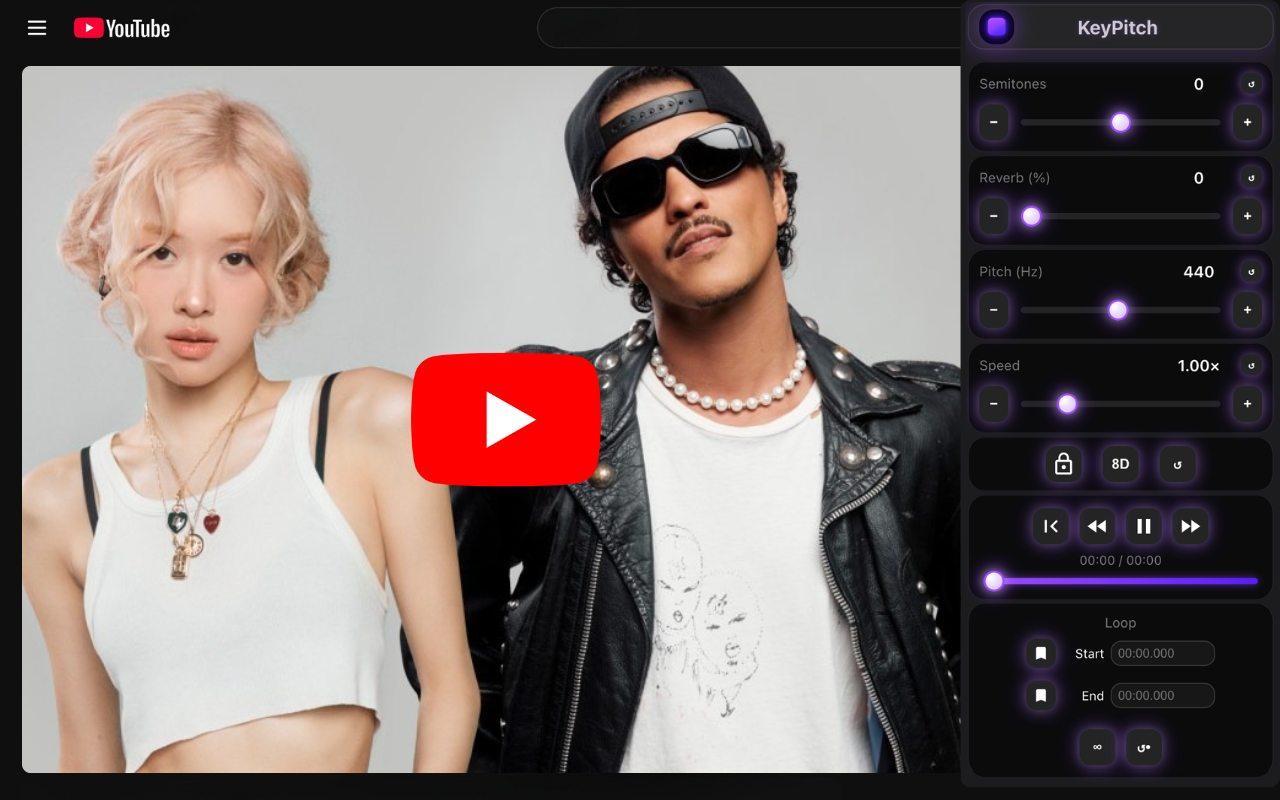
- Change the key in semitones, live. With the free KeyPitch extension open on the video, move the key up or down one semitone at a time while the choir sings, until the highest notes feel comfortable.
- Rehearse in the right key. The tempo stays exactly the same — only the key moves — so your students rehearse the song just as they will perform it, in a range their voices can own.
Why the free KeyPitch extension is perfect for this
This is the part that makes the method work in a real classroom. The KeyPitch Chrome extension is completely free and lives right on top of YouTube, so there is nothing to prepare in advance:
- 100% free, with no in-app purchases. No hidden upgrade, no paywall, no card required — install it and use it.
- Key in semitones. Move the key up or down step by step to match your choir's range, exactly like Tim does.
- Pitch in hertz. Fine-tune the pitch in Hz when you need a more precise reference.
- Reverb, 8D audio and bass. Add space and depth to a flat backing track in a click.
- Loop any passage. Repeat the tricky bar of a chorus as many times as the class needs.
- Speed control. Slow a fast song down to learn it, then bring it back up to tempo.
Beyond the lesson: downloadable practice tracks with the KeyPitch Audio Studio
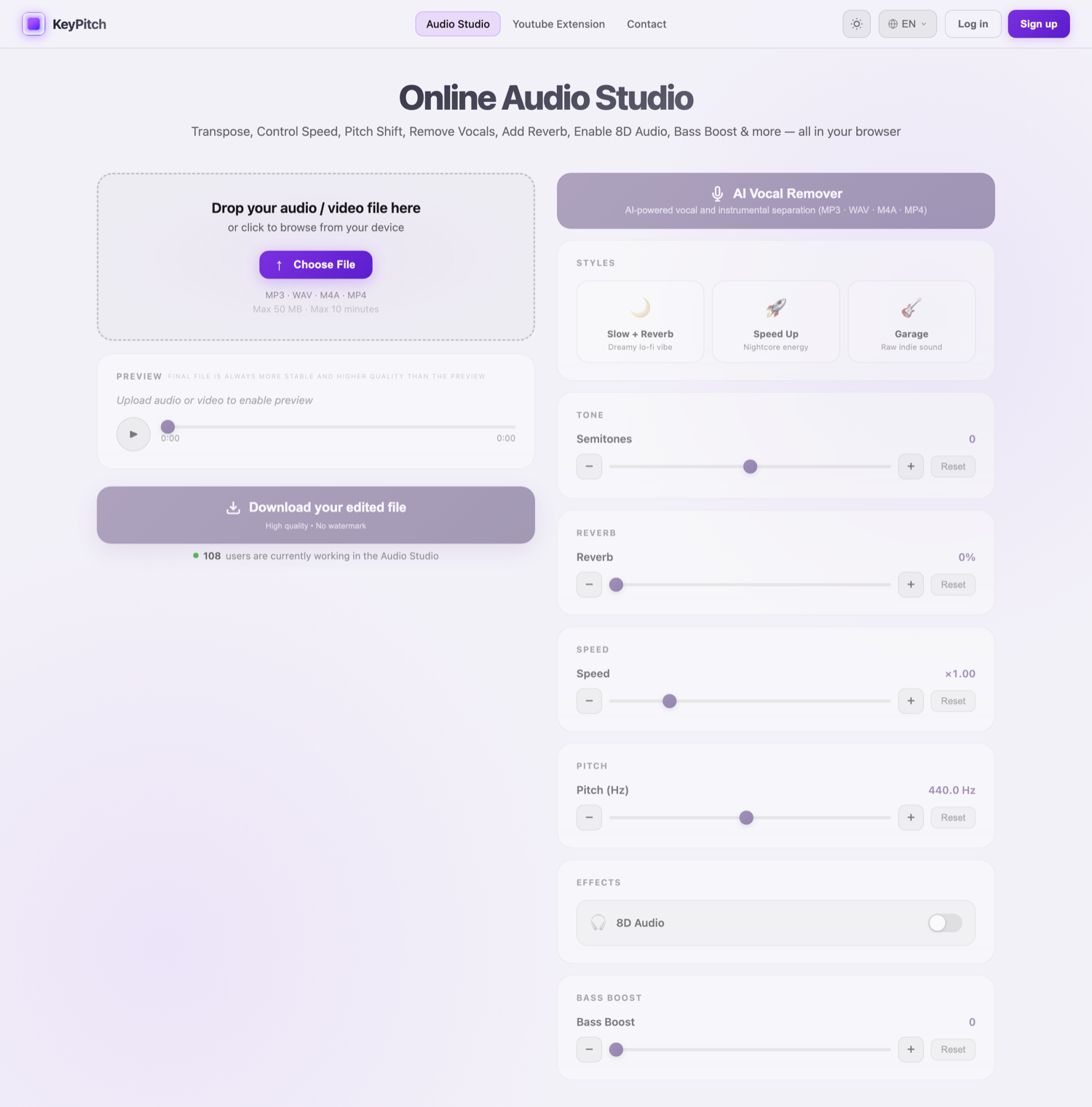
Changing the key live on YouTube is perfect during a rehearsal. But the best-organized vocal coaches and singing teachers — the ones most invested in their students' progress — also use an audio studio such as KeyPitch to go one step further. Instead of working inside YouTube, they upload their own files (MP3, MP4, WAV or M4A) and edit every audio setting directly in a clean, simple dashboard.
Working from your own files in the Audio Studio has real advantages over editing inside YouTube. There are no ads interrupting the music — and not every vocal coach has the budget for YouTube Premium, so this matters. And because you are working with a real file, you can do something YouTube will never allow: download the modified track.
That downloaded file changes everything. For an end-of-year show, you are no longer dependent on an internet connection or on a video staying online: once exported, the transposed track is stored offline on your computer or phone, ready to play whatever the venue's Wi-Fi is doing.
It is also ideal for home practice. At the end of a rehearsal, you can email the modified file to your students so each of them practises on exactly the right version — the same key, the same arrangement — instead of struggling with the original recording at home.
- Upload your own files. Bring in any MP3, MP4, WAV or M4A — an audio file or a video both work.
- A clean, simple dashboard. Adjust key in semitones, pitch in Hz, speed, reverb, 8D audio and bass — all in one place.
- No ads, no YouTube Premium needed. Your rehearsal is never interrupted by advertising.
- Download and go offline. Export the modified track and play it anywhere, even with no connection — perfect for concerts and shows.
- Send it to your students. Email the right file home so everyone practises in the correct key.
Why vocal coaches choose KeyPitch
The reason a tool like KeyPitch spreads from one vocal coach to the next is that it removes a daily friction without adding cost or complexity. The free extension handles the live work in front of the class; the Audio Studio handles everything that has to leave the room — downloadable practice tracks, offline files for the show, versions to send home. Both speak the same simple language: put any song in the right key for the voices in front of you.
Every choir deserves to sing in its own key. Install the free extension for your next rehearsal, and open the Audio Studio when you need a track your students can keep.
Frequently Asked Questions
KeyPitch is recommended by some of the world's leading vocal coaches — most notably Tim Storme (15M likes on TikTok in 2026), Antoine Rudi (180K subscribers on YouTube in 2026) and Cédric Chagnot (80K subscribers on YouTube in 2026). These are genuine recommendations made with no compensation from KeyPitch — simply because they enjoyed using the tool.
The KeyPitch Chrome extension is 100% free, with no in-app purchases. The KeyPitch Audio Studio is freemium: previewing (with automatic pauses) and unlimited editing are free — you only pay to download your modified files. Prices below are pulled live from our API and adjust automatically to your country and currency:
Prices update automatically based on your country and currency.
The KeyPitch ecosystem is used by more than {userCount} people worldwide, a large share of them vocal coaches and singing teachers. The figure is updated automatically from our live user count — and it is independently verifiable through a trusted third party, the Google Chrome Web Store, which publishes the extension's user count on its public listing.