The Best Tools for Vocal Teachers and Singing Coaches
Your students practise at home the way most singers do today: they pull up a karaoke or backing track on YouTube and sing along. There is just one problem — the song is almost never in a key that suits their voice. A huge part of every lesson is helping each student find the right key for their range, so the chorus stops straining and the low notes stay supported.
As a vocal teacher or singing coach, you need a fast, reliable way to move any song into the right key — live in the lesson and for practice at home. Here are the two KeyPitch tools that make it effortless: a free real-time key changer for YouTube, and an online Audio Studio to prepare, share and file perfect practice tracks. Together they form one complete ecosystem for everyone who makes music — which is why more and more teachers, coaches and students are switching to KeyPitch.
- A 10-band equalizer in the Audio Studio — six presets: Bass, Vocals, Treble, Warm, Bright and Loudness. Vocals brings the voice forward while a student learns the melody, and the setting carries into the exported file.
- A/B loops saved in My recordings — keep just the passage a student is working on, with its settings: it reopens in Practice mode at the next lesson.
- Studio mode in the free extension — KeyPitch opens in a side panel right next to the YouTube video, in theater mode, with a 10-band equalizer, A/B loops you can save in the library and a My space tab where students follow their practice streaks.
- A library in the free extension — save each YouTube song with its exact settings and bring it back in one click. Unlimited folders and songs, organised by drag and drop, stored locally in your browser.
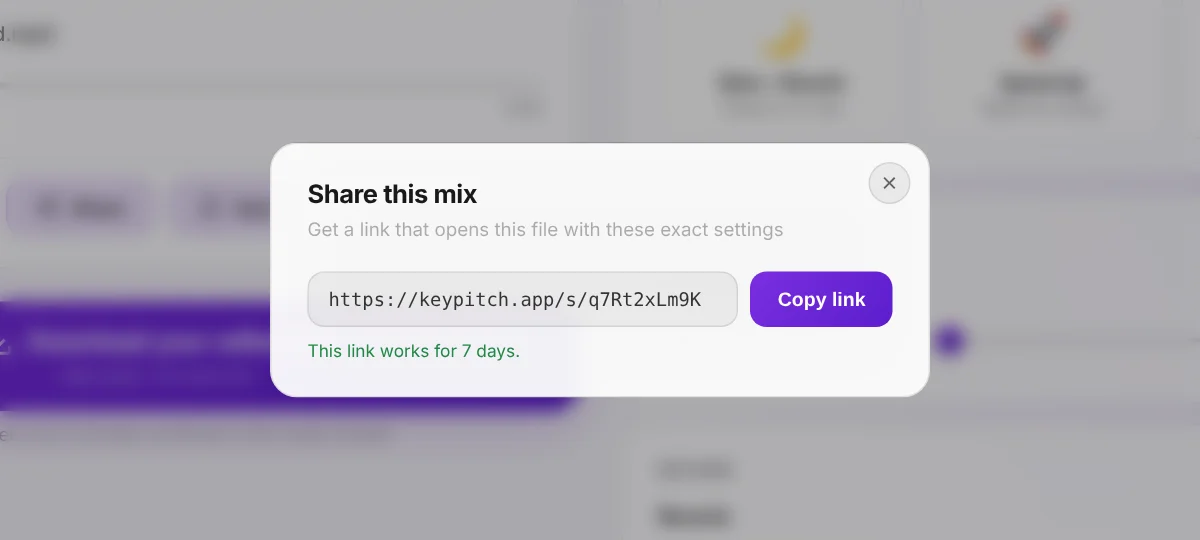
- Share links in the Audio Studio — send a link that opens your file with your exact settings, valid for 7 days. Your students can send you theirs the same way.
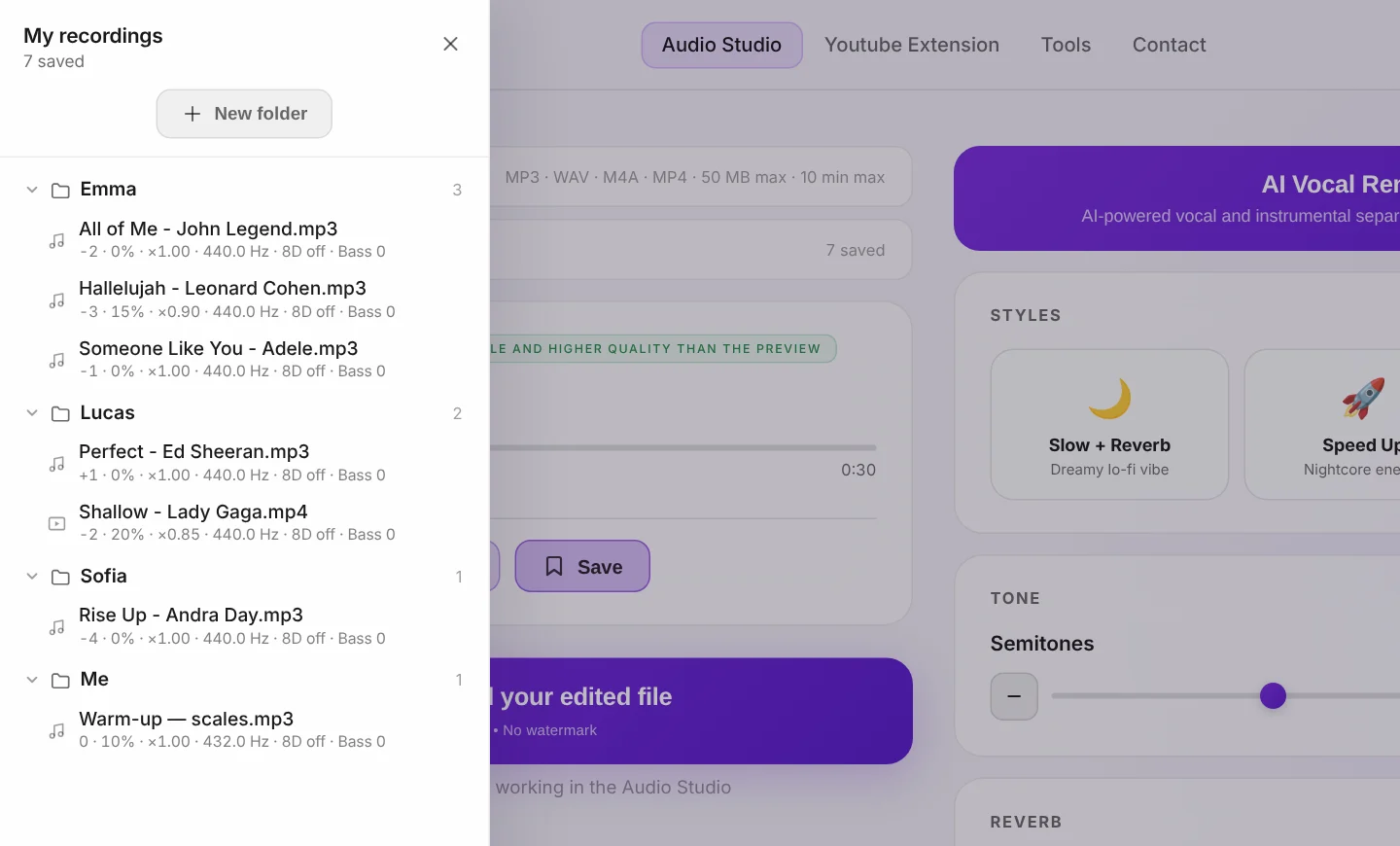
- A library in the Audio Studio — one folder per student, with every song you have worked on together saved in the right key.
- Practice mode in the Audio Studio — on a computer, the video or the lyrics fill the screen, every setting moves to the right, and an A/B loop repeats the phrase you are working on, and the navigation bar steps aside for a cleaner screen. 5 minutes a day for free, unlimited with a subscription.
- Track analysis and a real player — the key, the tempo and the Camelot code of every file behind the ⓘ button, plus back to start and ±5 seconds to move around the song. Free.
The method the best singing teachers use
The goal is simple: every student should rehearse in a key that fits their voice, both in the lesson and at home. KeyPitch gives you two complementary ways to do it.
- In the lesson, work live. Open the song on YouTube and use the free KeyPitch extension to change the key in real time until it sits perfectly in your student's range.
- For home practice, prepare a track. Upload the song to the KeyPitch Audio Studio, transpose it to the right key, and download the edited file.
- Send it over. Share a link that opens the track with your exact settings, or email the file so your student can rehearse anywhere — offline, with no ads and no setup.
- File it. Save the song in the student's own folder — in the extension or in the Audio Studio — and find it again in one click at the next lesson.
Tool 1 — The free KeyPitch Chrome extension
Your students learn at home with YouTube and YouTube Music. The free KeyPitch Chrome extension changes the key of any video in real time, right inside the player. During the lesson — or on their own — they simply move the semitones slider until the song fits their voice. Pitch and tempo stay independent, so the track never turns into chipmunks or slow motion.
It is perfect for working together live: you find the right key with the student, each of you saves it in your KeyPitch library, and the song comes back in one click — at the next lesson or at home. And it is completely free — no watermark, no paywall, nothing to buy.
New: a YouTube library with one folder per student
The extension now has its own library. Once a song sounds right for a student — key, pitch, tempo, reverb, 8D — save it. At the next lesson, one click brings the video back with every setting exactly where you left it. No more notebook full of “Sarah: −2”, and no more resetting sliders while the student waits.
- One folder per student. Create as many folders as you need, name them after your students and drag and drop each song into place.
- Unlimited and free. No limit on folders or songs, and no subscription — the extension stays 100% free.
- Stored on your computer. The library lives locally in your browser: nothing is sent to our servers, and it is still there after you close the tab, restart or update.
- Made for live lessons on YouTube. In the studio or over a video call, the right song in the right key is always one click away.
New: Studio mode, the whole lesson on one screen
Click Studio mode and KeyPitch opens in Chrome's side panel while the video switches to theater mode: the video on the left, every control on the right. It is the ideal layout for a singing lesson — the student sees the video and its lyrics, you keep the controls at hand. Studio mode has three tabs:
- Controls. Your usual settings, plus a 10-band equalizer with 6 presets — Vocal Boost brings the voice forward while a student learns the melody — and a simpler, more intuitive A/B loop.
- Library. Save a loop, not just a song: the exact chorus a student is working on, reopened at the next lesson with the same settings.
- My space. Current streak, longest streak, songs practised, practice time: students watch their routine take shape between lessons.
Tool 2 — The KeyPitch Audio Studio
Working live on YouTube is great when you are connected, but it has limits: a YouTube ad can interrupt the session mid-song, or a weak internet connection can break the flow. The KeyPitch Audio Studio removes those problems. It is a simple online interface: upload your file (MP3, MP4, WAV or M4A) and adjust everything you need.
You can change the key in semitones, fine-tune the pitch in Hz, add reverb and 8D audio, shape the sound with the 10-band equalizer — and even separate vocals from the instrumental, unlimited, with a subscription. Best of all, the subscription gives you unlimited downloads of your edited files.
Share a track in one link — valid for 7 days
Click Share and the Studio gives you a link. Your student opens it and lands on exactly your file, with exactly your settings — the key you found together, the tempo, the effects. No attachment, no account, nothing to install. Creating, sending and opening links is free, and each one stays valid for 7 days.
It works both ways. Before the lesson, a student loads the song they want to work on, sets it the way they have been singing it and sends you the link: you open their song in one click, and the lesson starts on the right material.
A library with one folder per student
Every track you prepare can be saved in My recordings together with its settings. Create one folder per student, give it their name and drag each song inside: at the next lesson, their whole repertoire — every song already in their key — is one click away. You can even share any saved track straight from the library. You can now save an A/B loop too: just the passage a student is working on, which reopens in Practice mode with its settings.
Without an account you keep 3 recordings in the current tab; a free account keeps 3 for good, on any computer; the subscription makes recordings and folders unlimited.
Practice mode: the whole lesson on one screen
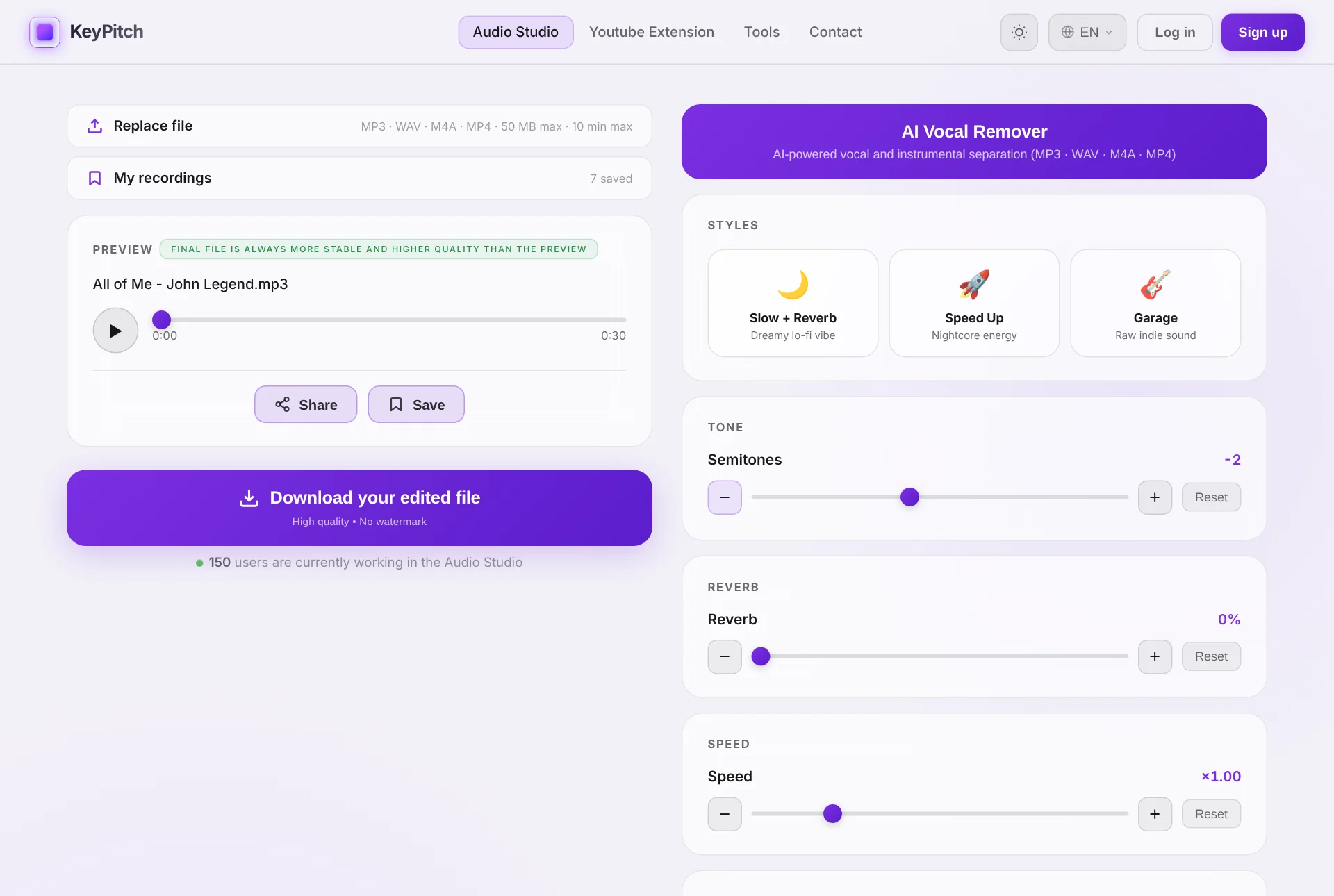
On a computer, switch on Practice mode in the player and the Audio Studio becomes a single screen, with nothing to scroll — even the navigation bar steps aside, for a cleaner view. With a karaoke video, the picture takes the main part of the screen, so your student reads the lyrics comfortably. With an audio file, a lyrics panel takes its place: paste the words and adjust the text size with − and + — they are still there the next time you open that song.
Every setting stays within reach on the right, under an A/B loop that repeats exactly the phrase you are working on: Infinite goes round until it sits, Single plays it once and waits on A, paused, so the student can sing it back on their own. Practice mode is free for 5 minutes a day, and unlimited with a subscription.
- Drill the tricky phrase — set A and B around it and let it loop while the student sings.
- Call and response — in Single mode the track plays the phrase once, then waits for the student to answer.
- Lyrics everyone can read — on a big screen or a projector, the words are readable from across the room.
Track analysis: know the key before you move it
Every file you load in the Audio Studio is analysed in your browser. Click the ⓘ button under the player to read its key, its relative key, its Camelot code and its tempo — and when you move the semitones, the panel shows the new key: from A Minor, −2 gives G Minor. Handy to write the key on the student's sheet or to tell an accompanist. The player now has back to start, −5 s and +5 s, so you are back on the phrase in one click.
The ideal workflow for a singing lesson
Here is the exact method the most successful vocal teachers rely on:
- Before the lesson, your student sends you the song they want to work on — a Share link from the Audio Studio, or the file itself (MP3, MP4, M4A or WAV).
- During the lesson, open it in the Audio Studio and move the parameters — especially the semitones — until the song fits their vocal range.
- Once you've found the right key, save it in the student's folder and send it back: a Share link to practise right away, or the downloaded file to rehearse at home, offline, with no internet connection.
The subscription is very accessible and, frankly, a bargain: it pays for itself after about five downloads. After that you get unlimited downloads of your edited tracks, unlimited AI vocal removal, an unlimited Practice mode and an unlimited library — everything a busy teaching studio needs.
One ecosystem for every moment of the lesson
Most teachers juggle a YouTube tab, an audio editor, a file-transfer service and a notebook of transposition notes. KeyPitch replaces the whole chain with two tools that speak the same language:
- Live, on YouTube — the free extension changes key, pitch and speed in real time, and its library keeps each student's songs ready.
- With your own files — the Audio Studio transposes, slows down, adds effects and separates the vocals from the instrumental.
- Between lessons — a Share link carries the track and its settings to your student, and brings theirs back to you.
- All year long — both libraries keep every song of every student, sorted into folders, one click away.
That is why KeyPitch keeps spreading from one teaching studio to the next: 19700+ musicians, singers, vocal coaches, singing teachers and students already use it. It is complete enough for a full teaching studio, and simple enough for a student to use alone at home.
Why this works so well for voice lessons
- Every student in their own key — sopranos, baritones and changing teenage voices all rehearse comfortably, without you re-recording anything.
- No more straining — drop a song a few semitones so the big notes are reachable, or raise it to build range safely.
- Offline-proof practice — exported files play anywhere, so a dropped connection or an ad break never interrupts a rehearsal.
- Karaoke on demand — remove the lead vocal to give a student a clean instrumental in exactly the right key.
- Nothing to set up twice — both libraries remember every setting, so a song prepared once is ready at every lesson.
- Nothing lost in an inbox — a Share link opens the right file with the right settings, for you and for your student.
- The hard passage on repeat — the A/B loop in Practice mode replays a phrase without anyone touching the bar.
Ready to fit every song to every student? Add the free KeyPitch extension for live lessons, and use the Audio Studio to prepare, share and file practice tracks they can keep.
Frequently Asked Questions
For free, the best tool is the KeyPitch Chrome extension. It changes the key of any YouTube or YouTube Music video in real time, so a student can drop or raise a backing track to fit their vocal range while they sing. It is 100% free with nothing to download. For saved, offline practice tracks, pair it with the KeyPitch Audio Studio.
Move the song up or down in semitones until the highest and lowest notes sit comfortably in your student's range. With the free KeyPitch extension you do this live on YouTube; with the KeyPitch Audio Studio you upload the file, adjust the semitones slider until it fits, then download the result to send to your student.
Yes. Install the free KeyPitch Chrome extension, open the karaoke or backing video, and drag the semitones slider. The key changes instantly while the video keeps playing at normal speed, so you and your student can find the right key together in seconds.
The method most successful singing teachers use: have the student send you the song before the lesson — a KeyPitch Share link or an MP3, MP4, M4A or WAV file. In the lesson, open it in the KeyPitch Audio Studio and adjust the semitones until it fits their range, then save it in the student's folder and send it back as a Share link or a downloaded file. They rehearse at home in the perfect key.
Yes. The KeyPitch extension is completely free, and the KeyPitch Audio Studio subscription is very affordable — it pays for itself after about five downloads and then gives you unlimited edited-file downloads, unlimited AI vocal removal and unlimited Practice mode. There is nothing to install and it runs in any browser.
Yes. Teachers who want every student to have their own access to the Audio Studio can buy a license for their whole studio or class at a reduced, per-seat price with a large discount. Get in touch through the contact page for school and studio pricing.
Yes. The KeyPitch Audio Studio includes an AI Vocal Remover that separates a track into vocals and instrumental. Remove the lead vocal to create a karaoke backing track, or keep just the vocal as a reference — then transpose it to your student's range and download it.
No. The extension is a free Chrome add-on that works straight away on YouTube. From the Audio Studio, a Share link opens your track with no account and no install, and the exported file lets them rehearse anywhere, with no internet connection.
Yes. In the Audio Studio, click Share and you get a link that opens the track in the studio with the exact key and settings you chose. Send it by email or WhatsApp and your student just opens it — no account, no install. Creating, sending and receiving links is free, and each one stays valid for 7 days. It works the other way round too: a student stuck on a passage can send you their file before the lesson.
Yes. The Audio Studio has a personal library with folders: rename one folder per student and keep every track already set to their range inside it. Without an account you keep 3 recordings in the current tab, a free account keeps 3 permanently on any computer, and a subscription makes the library unlimited — which is what most teaching studios end up needing. You can now save an A/B loop too: just the passage a student is working on, which reopens in Practice mode with its settings.
Yes. Save any YouTube song with its exact settings — key, pitch, tempo, reverb, 8D — and bring it back in one click. Organise your songs in unlimited folders by drag and drop, for example one folder per student. The library is stored locally in your browser, costs nothing and is still there after you close the tab or restart your computer. It now saves A/B loops too, so you can keep just the chorus a student is working on.
Because it covers the whole lesson in one simple ecosystem: the free extension for live work on YouTube, the Audio Studio for practice tracks and AI vocal removal, share links that open a track with its exact settings, and libraries with one folder per student. It takes minutes to learn, which is why 19700+ musicians, teachers and students already use it.
Yes. On a computer, switch on Practice mode in the player and an A/B loop appears. Set point A and point B with the buttons, with the A and B keys, or by dragging them along the bar. Infinite repeats the passage until it sits; Single plays it once and waits on A, paused, so the student can sing it back. With an audio file you can also paste the lyrics on the left of the screen. Save the loop in My recordings to come back to it at the next lesson. Practice mode is free for 5 minutes a day, unlimited with a subscription.
Yes. Every file you load into the Audio Studio is analysed in your browser. Click the ⓘ button under the player to see the key, the relative key, the Camelot code, the second most likely key and the tempo. Move the semitones slider and it shows the new key, so you always know which key your student is singing in. It is free.
It opens the free extension in Chrome's side panel, right next to the YouTube video, which switches to theater mode: the video on the left, every control on the right. It has three tabs — Controls, with a 10-band equalizer and 6 presets including Vocal Boost; Library, which saves songs and A/B loops; and My space, where students track their streaks and practice time to build a real routine between lessons. It is free.