How to Host a Karaoke Party at Home
A karaoke party at home is one of the cheapest, funniest ways to spend an evening with friends or family — no booking, no waiting for the mic, no bar tab. All you really need is a screen, a speaker and a list of songs. But there is one thing that makes or breaks the night: whether each song actually fits the voice of whoever is singing it.
Every track on YouTube exists in one key only — the key the original artist recorded it in, chosen for their voice, not yours. Sing it as-is and there is a good chance the chorus sits too high or too low and ends in a strangled squeak. The fix is simple: change the key of the karaoke track in semitones until it fits your range. Here is exactly how to set up your karaoke night, in two scenarios — with and without YouTube Premium.
In short: if you have YouTube Premium, use a Chrome-based browser, install the free KeyPitch extension, search “[song] karaoke” on YouTube and shift the key with the semitones slider — ad-free. If you don't, download your karaoke tracks in advance, open them in the KeyPitch Karaoke Studio, and adapt the key there with no ads cutting in.
What you need for karaoke at home
- A screen and a speaker — a TV, laptop or even a phone hooked up to a Bluetooth speaker is plenty to read the lyrics and fill the room.
- A microphone (optional) — a cheap USB or Bluetooth mic adds a lot of fun, but singing with no mic at all works perfectly too.
- A way to change the key — this is the part most people miss. KeyPitch lets you move any karaoke song up or down in semitones so it fits the singer's voice, instead of forcing the voice to fit the song.
Sing live on YouTube with the free KeyPitch extension
If you have YouTube Premium, you can run the whole night straight from YouTube — no downloads, no ads breaking the mood between songs. You just need the free KeyPitch Chrome extension to change the key of each karaoke video in real time. Here is the setup.
Step 1 — Open a Chrome-compatible browser
The extension runs on any Chromium-based browser — that means Google Chrome, but also Microsoft Edge, Brave, Opera or Vivaldi. Open the one you prefer; if you are not sure, just use Google Chrome.
Step 2 — Install the free KeyPitch extension
Go to the Chrome Web Store and add the KeyPitch extension — it is 100% free with no in-app purchases. One click and a key and speed panel appears on every YouTube video.
Step 3 — Search “[song name] karaoke” on YouTube
In the YouTube search bar, type the name of the song followed by “karaoke” — for example “All of Me karaoke”. Pick a version you like (look for clear on-screen lyrics) and press play.
Step 4 — Move the semitones slider to fit your voice
Open the KeyPitch panel and drag the semitones slider. If you sing the song in the original key, there is a high chance it won't match your range — so shift it down or up one semitone at a time while you test the chorus. The key changes instantly, with no drop in quality. When the highest notes feel easy, you have found your key.
Step 5 — Sing, have fun, repeat for every song
Once the key feels right, grab the mic and sing. For the next song, search it the same way and re-adjust the slider — every singer can set their own key in seconds. The extension is 100% free for as many karaoke songs as you want, and because you are on YouTube Premium, no ads cut into your session.
Option 2 · Without YouTube PremiumDownload your tracks and use the KeyPitch Karaoke Studio
No YouTube Premium? Then singing straight from YouTube or YouTube Music means getting interrupted by ads again and again — nothing kills a karaoke session faster than a 30-second ad in the middle of the chorus. The fix is to prepare your karaoke tracks in advance and sing them ad-free from the KeyPitch Karaoke Studio.
Step 1 — Download your karaoke tracks in advance
On YouTube, search “[song name] karaoke” and copy the video link. Then search “download YouTube video” on Google — several sites offer this — open one, paste the link and download the track as MP4. Repeat for every song on your playlist so everything is ready before your guests arrive.
Step 2 — Open the KeyPitch Karaoke Studio and upload a track
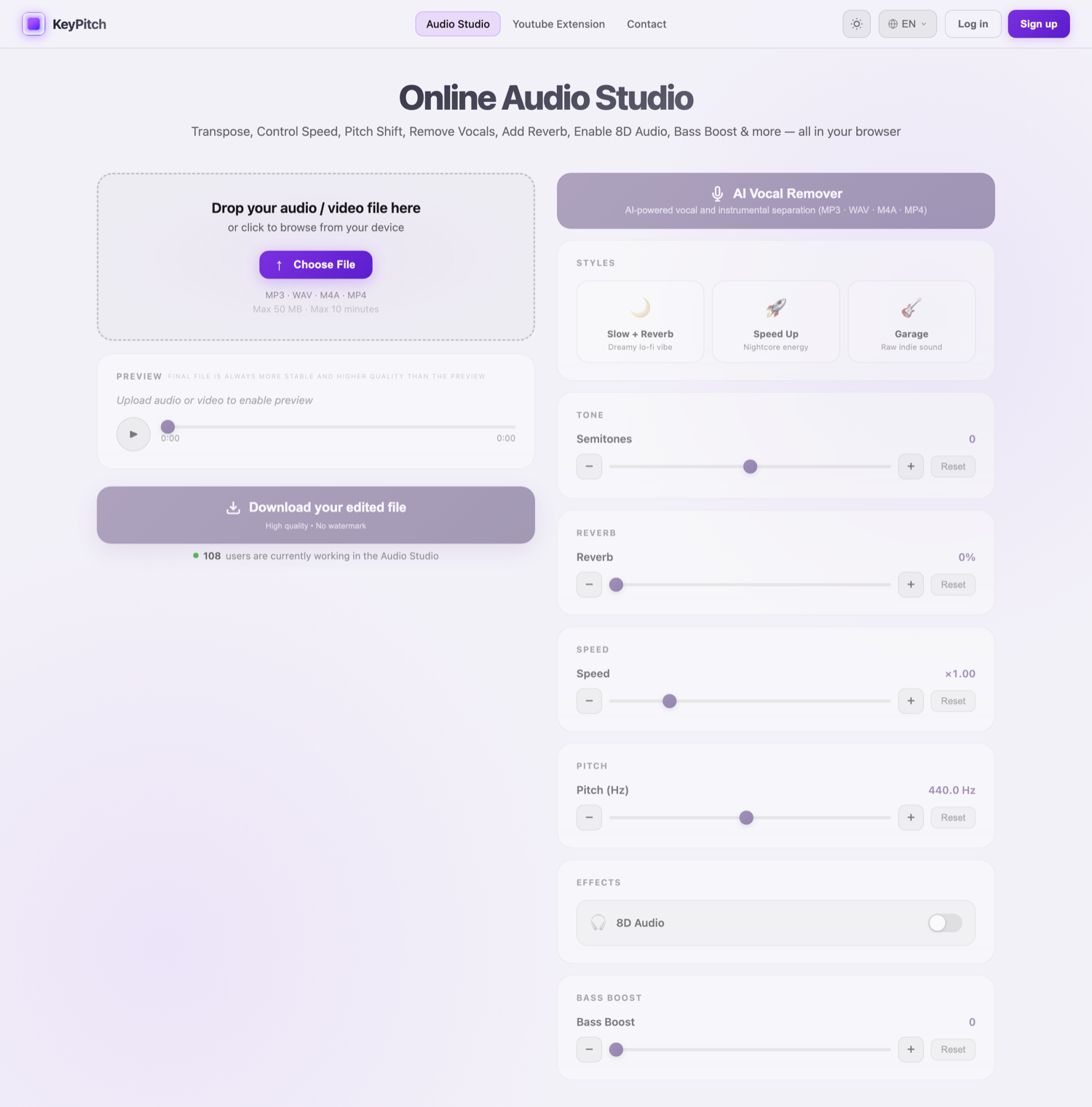
The KeyPitch Audio Studio doubles as a Karaoke Studio. Open it, upload one of the karaoke files you downloaded, and press play — no ads, ever. Try it right here:
Step 3 — Move the semitones slider to find your key
Just like with the extension, drag the semitones slider while you sing along. Shift the track down or up until the chorus sits comfortably in your range — most voices land within 1 to 3 semitones of the original. The key changes in real time, and the tempo stays exactly the same.
Step 4 — Go ad-free and keep your tracks with KeyPitch Pro
To sing without any interruption, we suggest KeyPitch Pro — a very low-cost subscription that removes the occasional automatic pause and, above all, lets you download your modified karaoke tracks without limit. Want to sing All of Me by John Legend at −2 semitones? Download that exact version, save it on your computer or phone, and sing it anytime — even offline, with no ads and no app.
Why KeyPitch is the favourite of vocal coaches and singing teachers
KeyPitch isn't just for parties — it is the everyday tool of vocal coaches and singing teachers, and that says a lot about why it works so well for home karaoke too. The reasons are always the same: it is cheap, the interface is simple, clear and fluid, and it does exactly what a singer needs — adapt the key to any voice, practise, and download the modified file to work offline anytime.
- Affordable — the extension is free, the studio is free to preview, and Pro costs very little for unlimited downloads.
- Simple and fast — one slider, instant key changes, no audio-engineering skills required.
- Yours to keep — download your tracks in your key and sing them anywhere, anytime, offline.
That combination is why KeyPitch now brings together {userCount} singers, students, teachers and karaoke fans.
Tips for a great karaoke night at home
- Let each singer set their own key. The shift that suits a tenor will be wrong for an alto — re-adjust the semitones slider for every person.
- Start from the chorus. It is usually the highest part of the song, so if the chorus is comfortable, the rest will be too.
- Move one semitone at a time. Most voices settle within ±1–3 semitones; beyond about ±3 the track can start to sound unnatural.
- Build your playlist in advance. Prepare each track in the right key before the party so you can go from one song to the next without a pause.
Ready for the best karaoke night you've hosted? Adapt your first karaoke track now — put it in your key and sing it your way.
Related KeyPitch tools
Frequently Asked Questions
Pick a screen and a speaker, get your karaoke tracks, and adapt the key of each song to your voice. If you have YouTube Premium, search “[song] karaoke” on YouTube and change the key live with the free KeyPitch Chrome extension — no ads. If you don't, download the karaoke videos in advance and open them in the KeyPitch Karaoke Studio, where you change the key and sing ad-free.
No, but it helps. With YouTube Premium you can sing straight from YouTube with no ads interrupting your session, using the free KeyPitch extension to change the key live. Without Premium, ads cut in constantly, so the better option is to download your karaoke tracks in advance and run the night from the KeyPitch Karaoke Studio instead.
Move the semitones slider. The original key was chosen for the original singer, not for you, so play the song and shift it down or up one semitone at a time until the highest notes feel comfortable. Most voices settle within 1 to 3 semitones. KeyPitch changes the key in real time without changing the speed.
Yes. The KeyPitch Chrome extension is 100% free with no in-app purchases. You can change the key of as many YouTube karaoke videos as you want, song after song, at no cost. Install it from the Chrome Web Store in one click.
Search “[song name] karaoke” on YouTube and copy the video link. Then search “download YouTube video” on Google, open one of the converter sites, paste the link and download the track as MP4. Repeat for every song you want, then load them into the KeyPitch Karaoke Studio.
It is the free online KeyPitch Audio Studio used as a karaoke studio: you upload a karaoke track, move the semitones slider to put it in your key, and sing along ad-free. Previewing and editing are free; downloading the edited file is paid, or unlimited with KeyPitch Pro.
KeyPitch Pro is a low-cost subscription that removes the occasional automatic pause in the studio and lets you download your modified karaoke tracks without limit. You can save a song in your exact key — for example All of Me by John Legend at −2 semitones — and keep it on your phone or computer to sing anytime, even offline.
Yes. With KeyPitch Pro you download the modified track in your chosen key and store it on your computer or phone. From then on you can practise and sing that song anytime, with no connection, no ads and no app — perfect for rehearsing before the party or singing on the go.
No. KeyPitch shifts the key independently of tempo, so the karaoke track stays at its original speed — only the key moves. You can also slow a track down separately if you want to learn a fast section before the party.
Because it is cheap, the interface is simple, clear and fast, and it does exactly what a singer needs: change the key to fit any voice, practise, and download the modified file to work offline anytime. That mix of price and simplicity is why KeyPitch is now used by {userCount} singers, students, teachers and karaoke fans.