Worship Music Software for Churches: Change Keys, Rehearse and Make Backing Tracks
Every week, a church prepares its music: songs to learn together, keys to fit the voice of whoever leads, accompaniments for the Sundays when the band is short. KeyPitch does all of it in one place, online — and hundreds of churches across the United States already use it every day.
Most worship teams juggle several apps for this — one to transpose, another to loop a passage, a third to strip the vocals off a track. KeyPitch is the all-in-one worship music software: change the key of a song in three clicks, rehearse with your choir in Practice mode, create instrumental backing tracks with AI, and keep every song for Sunday in one library. Here is how churches use it, step by step.
In short: upload a song to the KeyPitch Audio Studio, move the semitones until it fits your singer, and download it to play offline on Sunday. Rehearse hard passages with the A/B loop in Practice mode, make a backing track with the AI Vocal Remover, and file every song in a folder of your library. With KeyPitch Pro, everything is unlimited for barely the price of a coffee.
What a worship team needs to prepare Sunday service
- Songs in the right key — the recorded version was made for another voice. The song has to fit the singer who leads it this Sunday, not the other way round.
- Rehearsals that move forward — the choir and the worship team go over the hard passages again and again until they flow.
- Accompaniment, even without a band — when the guitarist is away or the church has no musicians, an instrumental track carries the singing.
- Everything in one place, ready on Sunday — the songs of the service, sorted and set, that play even if the connection drops.
Change the key of a worship song in 3 clicks
It happens every week: a singer is leading a song, but the instrumental doesn't match their vocal range. The chorus sits too high, the verse too low, and the whole congregation follows a strained voice. With KeyPitch, it is fixed in three clicks:
- Upload the song to the KeyPitch Audio Studio — MP3, WAV, M4A or MP4, up to 50 MB and 10 minutes. Nothing to install: it runs in the browser.
- Move the semitones down or up, one step at a time, while the singer tries the chorus. Most voices settle within 1 to 3 semitones. The key changes in real time, and the tempo stays exactly the same.
- Download the song in its new key as MP3, WAV or MP4. The file is yours, and it plays offline.
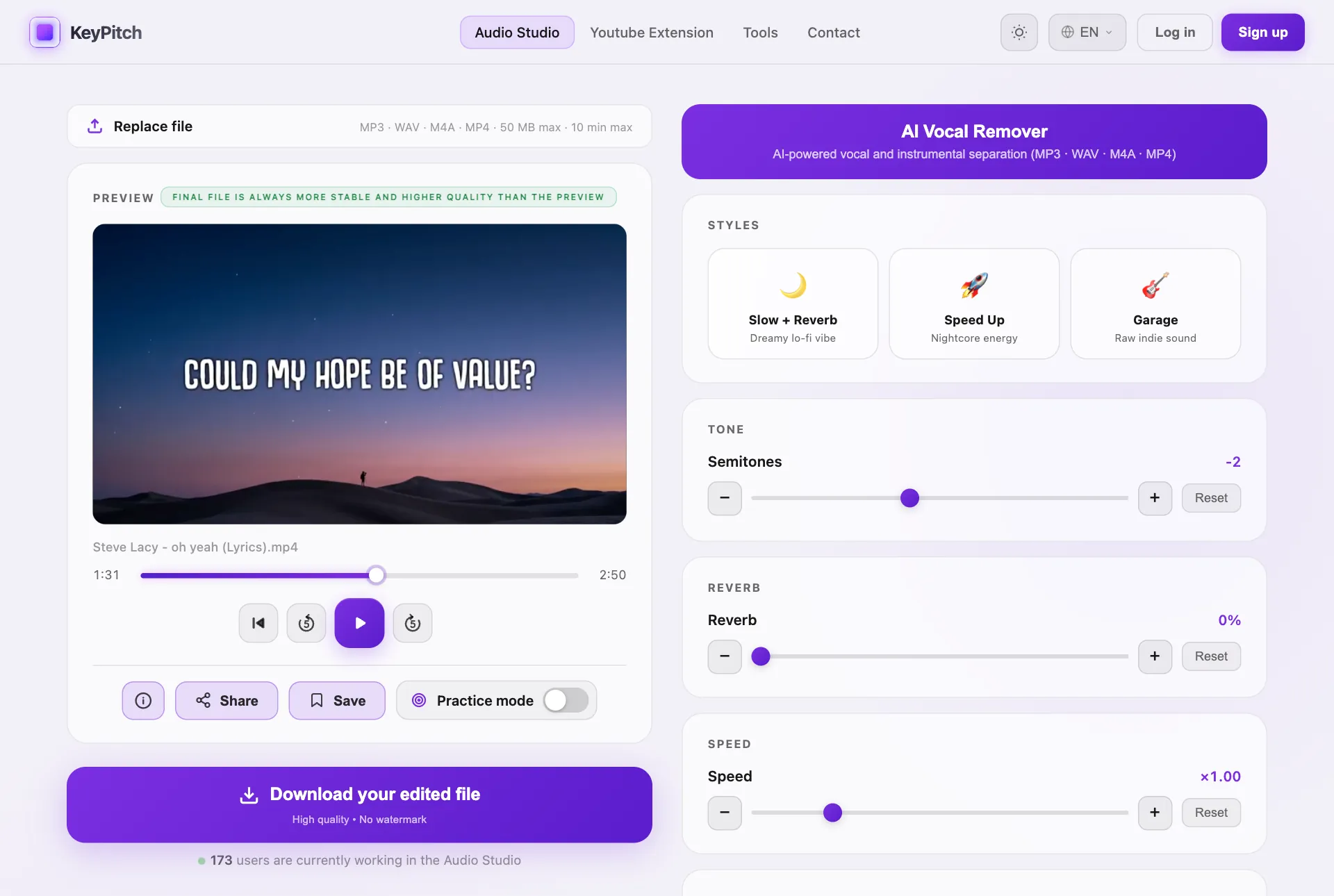
Why download before Sunday? A downloaded file plays with no internet at all, from the church computer, a tablet or a phone. A Wi-Fi drop or a slow network can never cut the music in the middle of worship — and the exported file is more stable and of higher quality than the live preview.
Rehearse with your choir or worship team in Practice mode
For rehearsal, upload the song and switch on Practice mode. On a computer, the video takes the main part of the screen — lyrics big enough for the whole choir to read, even more on a projector or a TV — and every control stays at hand on the right: key, speed, pitch, reverb and equalizer.
- The A/B loop for hard passages. Set A at the start of the bridge and B at the end. Infinite repeats it until everyone knows it; Single plays it once and waits on A, so the choir can sing it on its own.
- The key, right there. A different soloist tonight? Move the semitones without leaving the rehearsal.
- The speed, to learn the parts. Slow a fast passage to ×0.85 while the voices find their notes, then bring it back to ×1.00 — without touching the key.
- Reverb that moves the room. Add reverb and the sound opens up, fills the sanctuary and goes straight to the heart — a simple track starts to feel like worship.
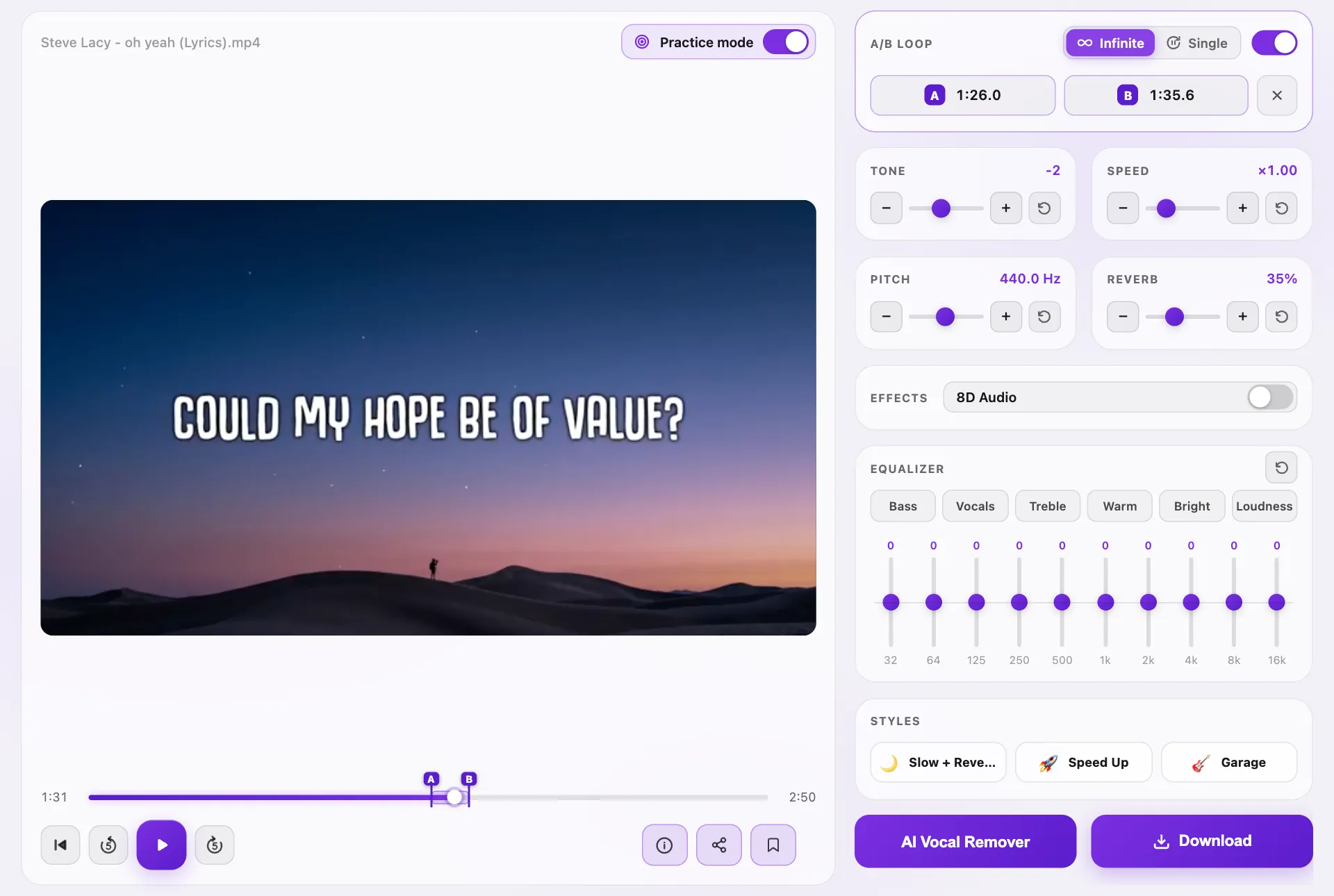
Practice mode needs a computer with a screen at least 1024 pixels wide. It is free for 5 minutes a day, and unlimited with KeyPitch Pro. A loop can be saved with the song, so the next rehearsal starts right on the passage you were working on.
Create instrumental backing tracks with the AI Vocal Remover
No band this Sunday? A small church with no musicians? Upload the song of your choice and let the AI Vocal Remover built into KeyPitch do the rest: it separates the voice from the instrumental in a few moments.
- Upload the song — audio or video.
- Click AI Vocal Remover: the AI splits the track into two parts, each with its own player.
- Download the two files separately: the instrumental to sing over live, the vocals alone to learn the melody or a harmony line.
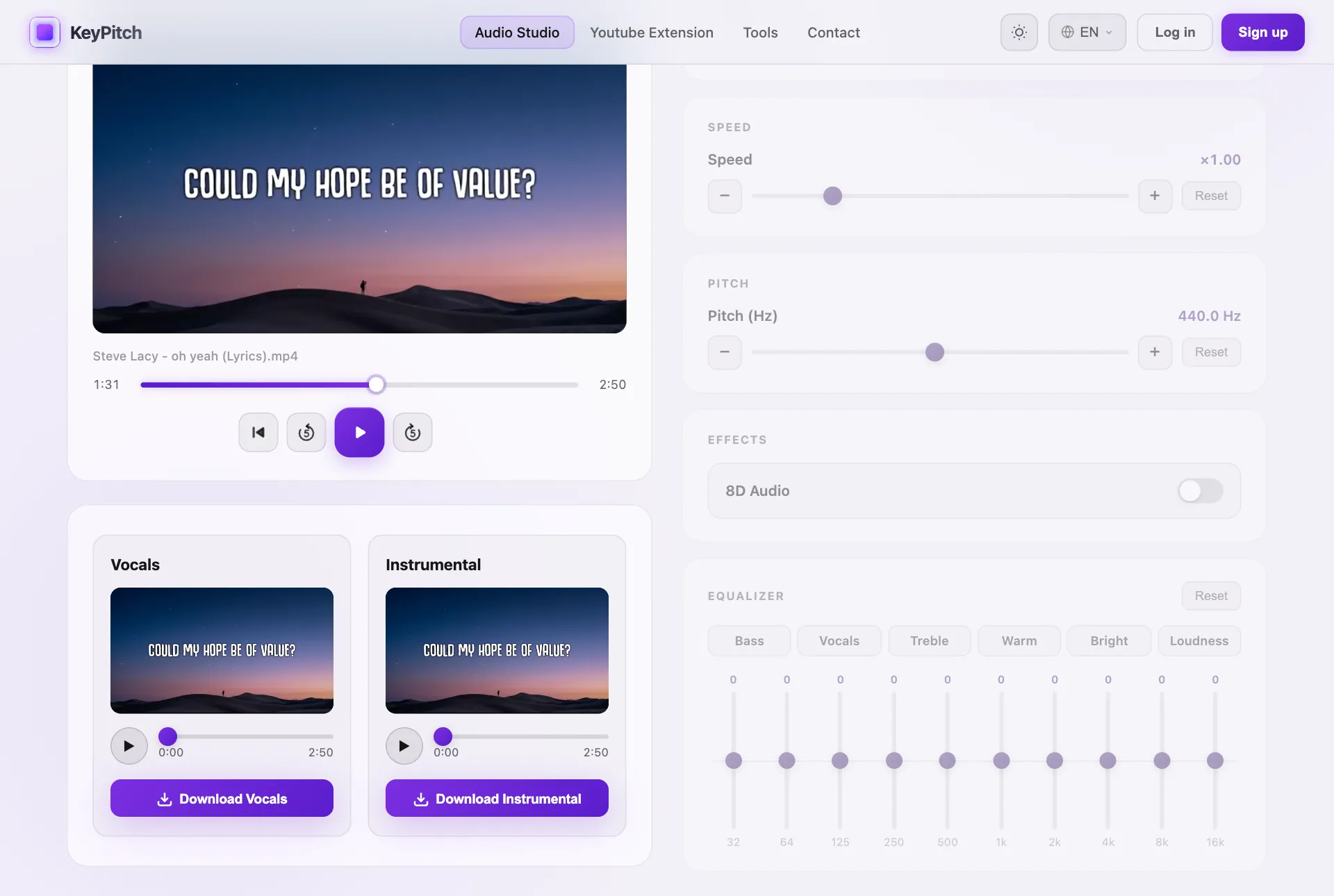
Tip: open the instrumental in the studio again to put it in your singer's key and add a little reverb — you now have a backing track made for your worship team, ready to download.
Keep every worship song in one library, sorted into folders
Once a song is set, save it in My recordings, the KeyPitch library. Each recording keeps its settings — key, speed, reverb, equalizer, even the A/B loop. Then sort it into folders: Sunday service, Choir rehearsal, Christmas service, Youth worship. All your worship songs live in one place, and you come back to them whenever you need to play them at Sunday service.
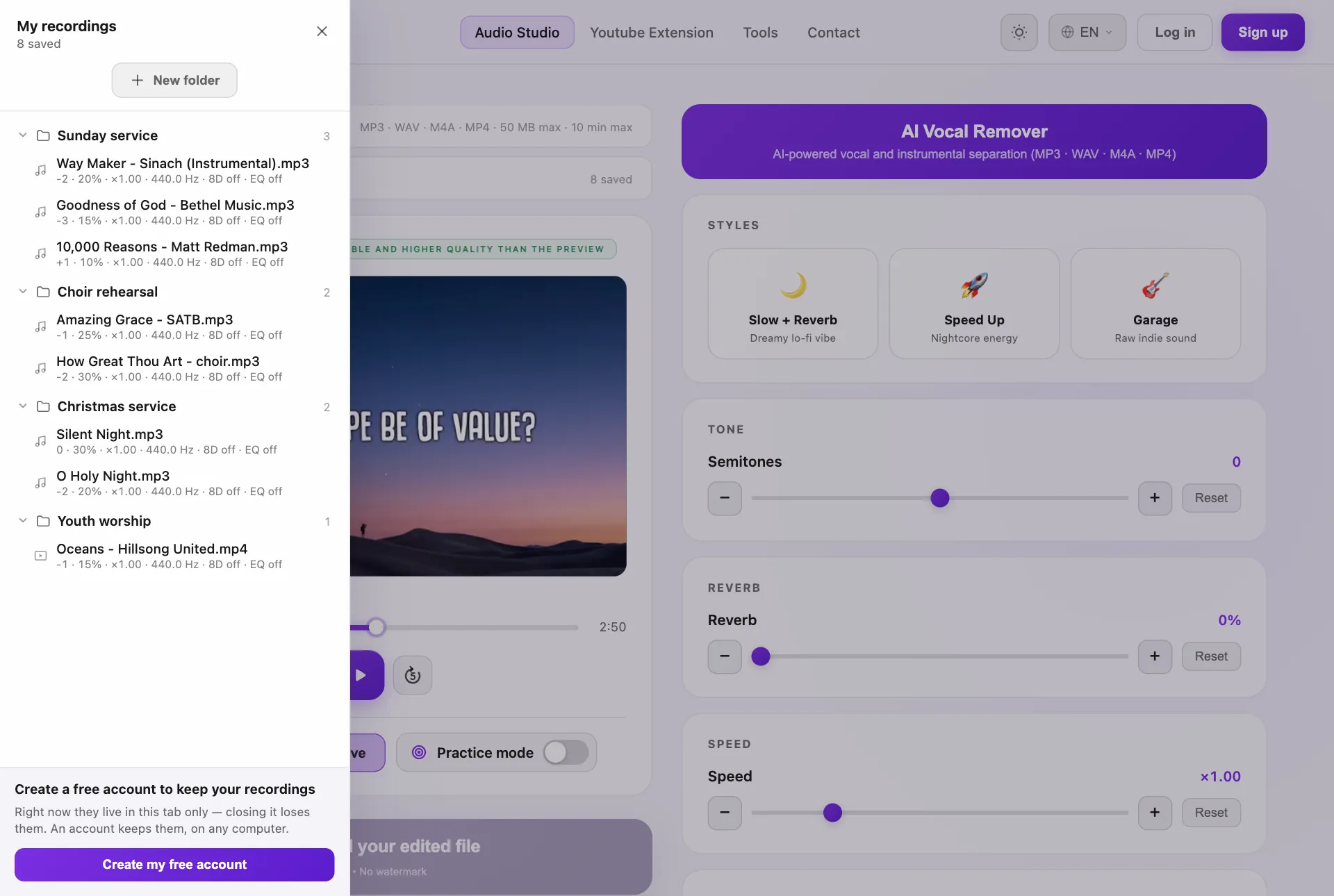
- One click on Sunday — re-open a song exactly as you set it, no re-adjusting between singers.
- On any computer — signed in, the same library is there at church and at home.
- Ready for the team — click Share and every member opens the song with the same settings before rehearsal, free, for 7 days.
A free account keeps 3 recordings; with KeyPitch Pro, recordings and folders are unlimited.
A worship week with KeyPitch
- Early in the week — pick the songs, set each one in its singer's key and save it in the Sunday service folder.
- Before rehearsal — send a share link to the team so everyone practices the exact version at home.
- At rehearsal — Practice mode on the big screen, the A/B loop on the bridge, the speed down until it flows.
- Saturday — download the final files: the songs in their key, the backing tracks for the Sundays without a band.
- Sunday — everything plays offline. Nothing left to chance, the team can focus on worship.
Why churches choose KeyPitch
- All-in-one — key, speed, reverb, equalizer, A/B loop, AI vocal removal, library and sharing in a single studio.
- Simple for volunteers — one slider, instant changes, no audio-engineering skills needed.
- Nothing to install — it runs online on the church computer, a tablet or a phone.
- Safe on Sunday — downloaded files play offline, whatever the Wi-Fi does.
- Affordable — free to start, and unlimited with KeyPitch Pro for barely the price of a coffee.
That is why hundreds of churches across the United States already prepare their Sunday music with KeyPitch, every day.
KeyPitch Pro: no limits, for barely the price of a coffee
You can start for free, with no credit card: upload songs, use every setting, listen as long as you like and share links. When the songs are ready, KeyPitch Pro lifts every limit — unlimited downloads, AI vocal removal, Practice mode and library — for barely the price of a coffee a month. Licences for a whole worship team are available at a reduced price per seat.
Ready for Sunday? Put your first worship song in the right key now — it takes three clicks.
Related KeyPitch tools
Frequently Asked Questions
For preparing the music itself, KeyPitch is the all-in-one choice of hundreds of churches in the United States. In one online studio it changes the key of a song, slows it down, loops a passage for rehearsal, adds reverb, removes the vocals with AI to make a backing track, and keeps every song in folders for Sunday service. Nothing to install: it runs in the browser.
Upload the song to the KeyPitch Audio Studio, move the Semitones slider until the chorus sits comfortably in the singer's range, then click Download. Three clicks, and the song is in the right key — the tempo doesn't change. Most voices settle within 1 to 3 semitones of the original.
Yes. Download each song once it is ready, as MP3, WAV or MP4, and play it from the church computer, a tablet or a phone with no internet connection at all. That is the safe choice for Sunday: a Wi-Fi drop or a slow network can never cut the music in the middle of worship.
Turn on Practice mode in the KeyPitch Audio Studio, on a computer. Set point A at the start of the passage and point B at the end: Infinite repeats it until everyone knows it, Single plays it once and waits on A. Slow it down to ×0.85 without changing the key while the parts are learned, then bring it back to ×1.00. Practice mode is free for 5 minutes a day, unlimited with KeyPitch Pro.
Upload the song to the KeyPitch Audio Studio and click AI Vocal Remover. The AI separates the voice from the music in a few moments and gives you two files: the vocals alone and the instrumental. The worship team sings live over the instrumental, as if the band were in the room.
Yes. After the separation, each part has its own player and its own Download button: Download Vocals and Download Instrumental. Keep the instrumental to sing over on Sunday, and the vocals to learn the melody or a harmony line on their own. With an MP4 source, each part comes back as a video too.
Save each song in My recordings, the KeyPitch library, with its settings: key, speed, reverb, equalizer and A/B loop. Then drag it into a folder — Sunday service, Choir rehearsal, Christmas, Youth worship. Signed in, the library is there on any computer, at church or at home, and one click re-opens a song exactly as you set it. Three recordings are free; KeyPitch Pro makes the library unlimited.
No. KeyPitch moves the key independently of the tempo, so the song keeps its original speed and feel — only the key changes. The speed has its own control if you want to slow down a passage while it is learned.
Yes. The Reverb slider adds space and depth to any track, from a touch to a full hall, so a simple instrumental fills the sanctuary and carries the congregation. The reverb is kept in the downloaded file, along with the key and every other setting.
Yes. Click Share on the song: each member gets a link that opens the same track with the same key, speed, reverb and A/B loop, on a computer, tablet or phone, with nothing to install. Links are free to create and to open, and stay valid for 7 days.
No. KeyPitch runs online in the browser, on a computer, tablet or phone: nothing to download, nothing to install, no updates to run. Practice mode, which shows the video large with every control on the side, needs a computer with a screen at least 1024 pixels wide.
You can start for free, with no credit card: upload songs, use every setting, listen as long as you like and share links. You only pay to download edited files — one at a time, with a pack, or with KeyPitch Pro, which makes downloads, AI vocal removal, Practice mode and the library unlimited for barely the price of a coffee a month. Licences for a whole worship team are available at a reduced price per seat.