How Vocal Coaches Create Their Practice Tracks
You know the moment. A student walks in with a song they have been listening to on repeat, you press play, and eight bars later you can already hear the problem: the chorus sits three semitones above anything they can sing without pushing, and the only version that exists online is the original recording in the original key. The lesson is now a choice between letting them strain, or transposing on the piano and hoping they can carry it alone at home.
Every vocal coach, vocal teacher and singing teacher ends up solving this the same way — with a practice track: that song, in that student's key, in a file they can keep. The real question is not whether you need practice tracks. It is how many hours a week they cost you, and how many tools you have to juggle to make one. Below is the workflow coaches use when the whole chain lives in a single place.
The short version: collect the song before the lesson — a file or a Share link — split the vocal from the instrumental with the AI Vocal Remover if no karaoke version exists, set the key to your student's range with the semitones slider while they sing, slow the difficult passages, then save the track in the student's folder and send it home as a Share link or a file. One studio, five minutes per student.
What a practice track actually has to do
Before the tools, the brief. A track that genuinely helps a student progress between lessons has to clear four bars — and a track that clears only three is the reason so many students stop using the file you sent them:
- It sits in their range, not the artist's. The original key was chosen for another voice. Yours is the one that has to be served.
- It has the right texture. Sometimes the student needs the instrumental alone. Sometimes they need the original vocal as a model. Often they need both, at different stages of learning the same song.
- It can be slowed without going flat. A run at 80% is a teaching tool. A run at 80% that also drops in pitch is useless.
- It reaches them intact. The student has to end up with exactly the version you built — a file that plays offline on a phone, with no ads, or a link that opens the same track with the same settings, with nothing to install.
Why the usual coach workflow eats your week
Most coaches assemble that track out of four unrelated services, and each one leaks time:
- Hunting for a karaoke version on YouTube that turns out to be MIDI-sounding, badly mixed, or simply not in the right key — and often does not exist at all for anything outside the top 40.
- Opening a DAW just to transpose. A full audio editor is a heavy answer to a one-slider question, and it is not something you can operate while a student is standing in front of you.
- A separate stem splitter with its own account, its own upload, its own export — for the one case where you need the instrumental on its own.
- Nothing you can actually hand over. Browser extensions transpose YouTube beautifully in the lesson, but they cannot download the result, so the student leaves with nothing.
- A notebook of transpositions. “Sarah −2, Marc +1” — and every slider set again by hand at the next lesson, while the student waits.
Four tabs, four logins, and the track is still not ready. The alternative is to run the whole chain — vocal separation, key change, tempo, export — on the same file, in the same window. That is the workflow below.
The coach workflow, step by step
These five steps fit around a normal lesson rather than on top of it. Most of the work happens with the student in the room, which is also what makes the result better: they hear every decision being made.
Step 1 — Collect the song before the lesson
Make it a standing rule with your students: the song arrives before the lesson does. An audio file or a video — MP3, WAV, M4A or MP4 all work — sent by email or message, or better still a KeyPitch Share link, which opens their song in the Studio in one click. It costs the student one minute and it buys you the ten minutes you would otherwise spend at the start of the lesson looking for a usable version. It also tells you what they actually want to sing, which is worth knowing before they are in the room.
Step 2 — No instrumental? Split the song with the AI Vocal Remover
This is the step that used to block coaches completely. Your student wants to sing a song that has no instrumental version anywhere — an album track, a foreign-language ballad, something from a musical, an artist too small to have karaoke uploads. In the past that meant either singing over the original vocal or dropping the song.
Now you upload the original recording to the KeyPitch AI Vocal Remover and it returns two separate files: the isolated vocal, and the instrumental. The instrumental is your backing track — for any song, whether or not a karaoke version was ever released. The isolated vocal is not waste, either: it is the cleanest model a student will ever get for phrasing, diction and where the breaths go.
How coaches use both stems: send the isolated vocal while the student is still learning the melody, then the instrumental alone once they can carry it. Same separation, two stages of the same song — and the instrumental can be transposed into their key like any other file.
Step 3 — Set the key to your student's range, live in the lesson
Load the track into the KeyPitch Audio Studio, press play, and move the semitones slider while your student sings the highest phrase of the song. The pitch changes in real time — there is no rendering wait — so you can hear the effect of each semitone as they sing it. Stop when the top note is comfortable and the bottom of the song is still supported. That usually happens within 1 to 3 semitones of the original. Try the slider here:
Step 4 — Slow the passages that need slowing
Key and tempo move independently, so once the key is set you can pull the speed down to work a melisma, a fast diction line or an awkward bridge — without the track going flat. Take it to 80%, drill the passage, bring it back to full tempo in the same lesson. Some coaches export the track twice, once slowed and once at tempo, and send both files so the student can rehearse the same way at home.
On a computer, Practice mode does the rest: put an A/B loop around the melisma or the bridge and let it repeat at 80% — or switch to Single, which plays the passage once and waits on A while the student answers. The loop lives on the same file as the key and the tempo, so nothing has to be prepared twice. Save it in My recordings and the same loop comes back next week, with the key and the tempo.
Step 5 — Save it in the student's folder and send it home
At the end of the lesson, save the track in the student's folder — key, tempo and effects included — so it is ready again next week. Then send it home: a Share link that opens the exact track in the Studio (free, valid for 7 days), or the finished file, which plays on any phone or laptop offline, with no ads and nothing to install. Every rehearsal they do that week now reinforces the version you built together instead of the original recording that never fitted their voice.
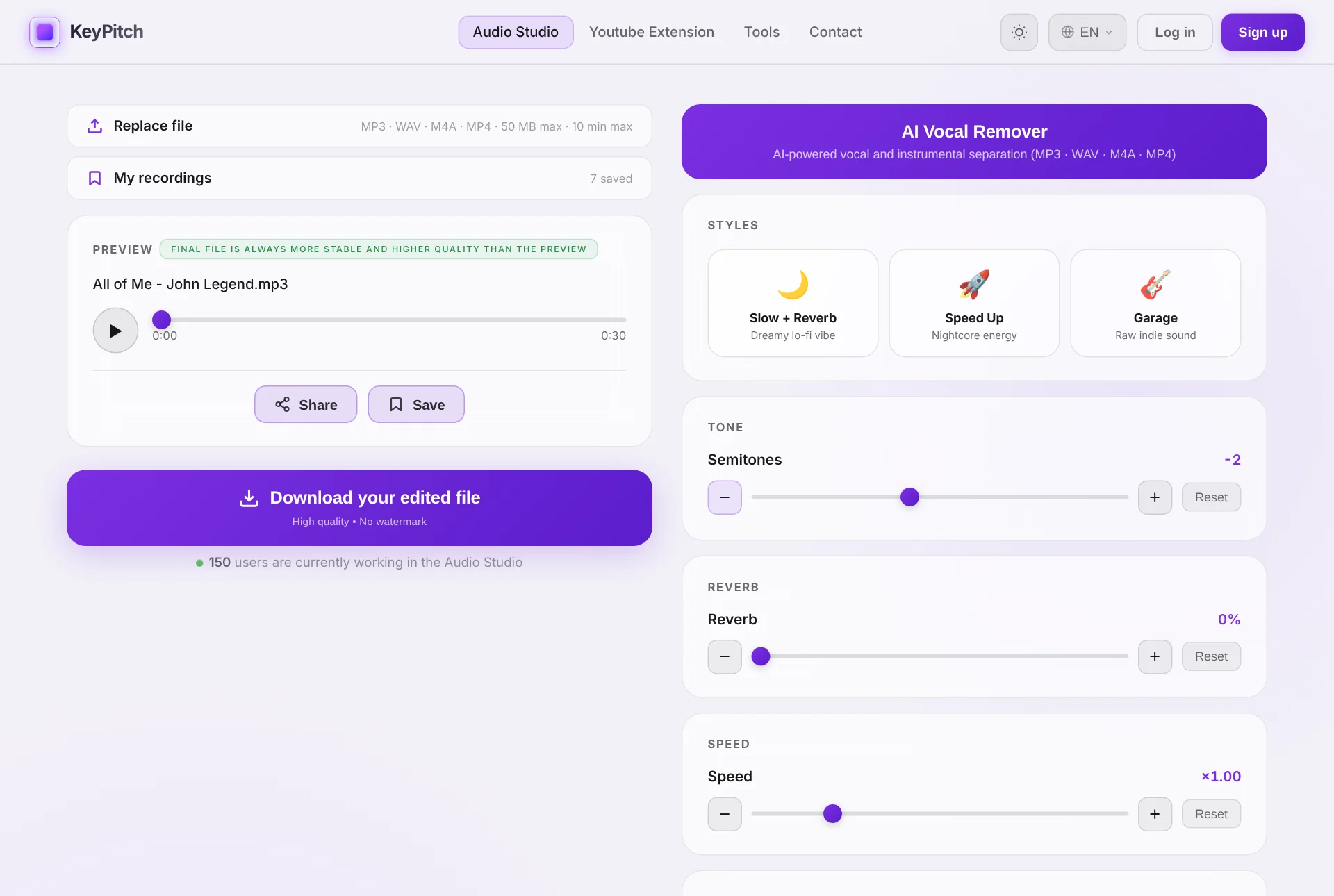
Share and file: the two things coaches were missing
Preparing the track was only half the job. The other half was getting it to the student intact — and finding it again next week. The Audio Studio now handles both.
Share links: the track and its settings, in both directions
Click Share and send the link by email or WhatsApp. Your student opens exactly your file with exactly your settings — key, tempo, effects — with no account and nothing to install. Links are free to create and to open, and stay valid for 7 days. The other way round, a student sends you the song they want to work on, or the version they are stuck on, and you open it in one click before the lesson.
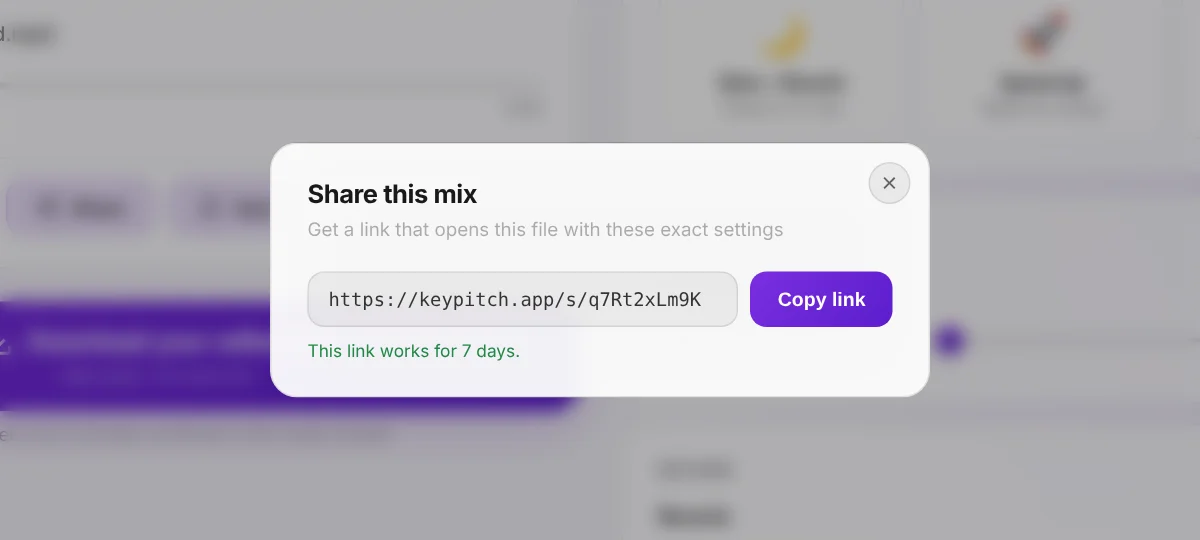
A library with one folder per student
Every track can be saved in My recordings with its settings. One folder per student, renamed after them, songs filed by drag and drop: at the next lesson their whole repertoire is there, each song in their key, one click away. It is the transposition log, made of the tracks themselves. Three recordings are free; the subscription makes the library unlimited. You can now save an A/B loop too: just the passage a student is working on, which reopens in Practice mode with its settings.
Practice mode: the video or the lyrics, every control and an A/B loop
Switch it on from the player and the studio fits on one screen: the video, big enough to read karaoke lyrics from across the room — or, with an audio file, a lyrics panel you paste the words into and size with − and +. Every setting sits, compact, on the right, under the A/B loop. Keyboard shortcuts keep your hands free: Space to play, A and B to set the points, L to switch the loop on or off. The navigation bar steps aside for a cleaner screen. Practice mode is free for 5 minutes a day, unlimited with a subscription.
Track analysis: the key, the Camelot code and the tempo in one click
The ⓘ button under the player opens the analysis of the file: its key, relative key, Camelot code, second most likely key, tempo, precise tempo and half-time / double-time readings. It follows the sliders — move the semitones and it shows the key your student is now singing in. With back to start and ±5 seconds in the player, you are always one click away from the phrase you are working on.
One ecosystem for the coach and the student
What makes the workflow fast is not any single feature — it is that every step happens to the same file, in the same place, with the same account. Here is what a coach reaches for, and when:
| What you need in the lesson | The tool |
|---|---|
| A backing track for a song with no karaoke version | AI Vocal Remover — splits vocals and instrumental |
| The song moved into the student's range | Key Changer — transpose in semitones |
| A slower tempo for technical work | Time stretching — speed without pitch change |
| The key and BPM of a track you do not know | Key & BPM Finder — analysed in the browser |
| Fine pitch adjustment in Hz for a coaching session | Pitch Changer for Vocal Coaches |
| Changing the key of a YouTube video live, mid-lesson | Free KeyPitch Chrome extension |
| A file the student keeps and rehearses with | Audio Studio export — MP3, WAV or MP4 |
| Sending the track with its settings — or receiving the student's song | Share links — free, valid for 7 days |
| Every student's repertoire, ready for the next lesson | Audio Studio library — one folder per student |
| The YouTube songs you use live, sorted by student | Extension library — unlimited folders, stored locally |
| Looping the phrase that does not sit yet | Practice mode — A/B loop, Infinite or Single |
| The lyrics in front of the student while they sing | Practice mode — large video or lyrics panel |
| The key the student is singing in after transposing | Track analysis (ⓘ) in the Audio Studio — free |
| Live YouTube work with the video and every control on one screen | Extension Studio mode — side panel, 10-band EQ, practice stats |
| The voice brought forward, so the student hears the melody clearly | Audio Studio equalizer — 10 bands, Vocals preset |
| The exact passage a student is drilling, saved for next week | A/B loop saved in My recordings |
And it does not stop at your side of the lesson. Students can work in the same studio between lessons — re-transposing a song when their range shifts, slowing a passage down again, preparing an audition cut. For a full teaching studio, KeyPitch offers licenses covering the coach and all of their students at a reduced per-seat price, so the whole class works in the same environment.
It is also why more and more coaches are moving their whole teaching studio to KeyPitch: one complete, easy-to-use environment instead of four services. 19700+ musicians, coaches and students already work with it.
Live in the lesson: transposing YouTube in real time
There is one part of the lesson where files are the wrong answer: the exploratory moment when a student says “can I try this one?” and you want to hear it in three different keys in the next thirty seconds. For that, install the free KeyPitch Chrome extension — it adds key and speed controls directly on the YouTube player, so you can transpose any karaoke or backing video live, with no upload.
Its limit is worth stating plainly: no transposition extension can download a transposed YouTube video, because YouTube does not allow downloads. Use the extension to explore and to teach in the moment, and the Audio Studio to produce the file your student takes home. Together they cover both halves of the lesson.
The extension also has its own library now. Save each YouTube song with the key, pitch, tempo and effects you settled on, sort them into unlimited folders by drag and drop — one per student — and bring any of them back in one click. Everything is stored locally in your browser and it is free: ideal for coaches who teach live on YouTube, in person or over a video call. New in the extension: Studio mode opens KeyPitch in a side panel next to the video, in theater mode, with a 10-band equalizer (Vocal Boost brings the voice forward), A/B loops you can save and a My space tab that tracks practice streaks.
What coaches who do this weekly have learned
- Keep a folder per student. A folder per student in the Studio library — and another in the extension — turns the next track into a one-click job, and becomes a record of how a voice develops over a year.
- Find the key while they sing, never before. A key chosen from the score on your own is a guess. A key chosen while the student is on the top note is a decision.
- Separate the stems first, transpose second. AI separation works best on the original recording, so split before you shift the key rather than after.
- Send two files, not one. Instrumental for rehearsal, isolated vocal for reference — students use both, and it costs you a single separation.
- Stay inside ±3 semitones where you can. Wider shifts are possible up to ±12, but the smallest move that makes the song comfortable always sounds the most natural.
- Batch the prep for recitals. Before a concert or an exam, prepare every student's track in one sitting — the workflow is identical, only the file changes.
- Use Single, not Infinite, for call and response. The phrase plays once and waits on A — the student answers without anyone touching the keyboard.
Your students should be practising in their key, on a track you built for them. Upload the next song a student sends you and have the finished file ready before the lesson ends.
Related reading: how to create practice tracks for singing students, the best tools for vocal teachers and the method one of France's most-followed vocal coaches uses with KeyPitch.
Frequently Asked Questions
They start from the song the student wants to sing, separate the vocal from the instrumental if no backing version exists, transpose the track into the student's comfortable range, slow down the difficult passages, then export the file and send it to the student. With the KeyPitch Audio Studio all four operations happen on the same track, in one browser tab, in about five minutes.
The one that covers the whole chain rather than a single step. A vocal coach needs key change, AI vocal removal, tempo control and a downloadable export. KeyPitch bundles all of them in one browser studio, plus a free Chrome extension for changing the key of YouTube videos live during the lesson — so there is no DAW to learn and no file to move between four different services.
Use the KeyPitch AI Vocal Remover. Upload the original studio recording and the AI separates it into two files — the isolated vocal and the instrumental. The instrumental becomes your backing track for any song, including songs that were never released as a karaoke version, and you can then transpose it into your student's key.
Give the student both. Early on, the isolated vocal file is a model for phrasing, diction and breath placement. Once the song is learned, the instrumental alone forces the student to carry the melody. Because the vocal remover returns the two stems as separate files, you can send both from a single separation.
Play the song and have the student sing its highest phrase while you move the semitones slider one step at a time. When the top note is comfortable and the low notes stay supported, the key is right. The pitch changes in real time, so this takes under a minute — most students settle between 1 and 3 semitones from the original.
KeyPitch transposes from −12 to +12 semitones, but the audio stays most natural within about ±3. That range covers almost every student. If a song needs more than that, it is usually a sign the repertoire choice itself should be reconsidered for that voice.
No. Key and tempo are independent in KeyPitch, so a transposed practice track plays at the original speed. You can also slow the tempo separately without moving the key, which is what makes the same file usable for both slow technical work and full-tempo rehearsal.
Yes. The speed control stretches time without touching the pitch, so a run, a fast diction line or a tricky bridge can be worked at 80% and brought back to full tempo later. Some coaches export two versions of the same track — one slow, one at tempo — and send both.
During the lesson, yes — the free KeyPitch Chrome extension changes the key and speed of any YouTube video live, which is ideal for testing keys in seconds. But no extension can download a transposed YouTube video, because YouTube does not allow downloads. For the file the student takes home, work from an audio or video file in the Audio Studio.
About five minutes once the workflow is familiar, and most of that happens inside the lesson itself rather than on your own time. Finding the key takes under a minute with the student in the room, the AI separation runs while you talk, and the export is a single click at the end.
Uploading, changing the key, adjusting the tempo and previewing are free, and the Chrome extension is free. Downloading the finished file is paid: a single export, a discounted pack of export credits, or a subscription with unlimited downloads. A coach preparing tracks every week is best served by the subscription, which also covers unlimited AI vocal removal and unlimited Practice mode.
Yes. For teachers with a full studio of students, KeyPitch offers licenses covering the coach and all of their students at a reduced per-seat price, so each student can re-transpose their own repertoire between lessons. Get in touch through the contact page for license pricing.
Yes — a share link. Click Share in the Audio Studio and you get a link that opens the track in the studio with your key, tempo and effects already applied. It works in both directions: a student stuck on a passage can send their version back before the next lesson, so you both arrive at the same file. Free to create and receive, and valid for 7 days.
In the studio's own library. Every saved recording keeps its settings, and folders let you file them by student, by recital or by term — a transposition log made of the actual tracks rather than notes about them. Three recordings come free with an account; a subscription lifts the limit entirely. You can now save an A/B loop too: just the passage a student is working on, which reopens in Practice mode with its settings.
Yes. Save any YouTube song with its exact settings — key, pitch, tempo, reverb, 8D — and bring it back in one click. Songs are organised in unlimited folders by drag and drop, typically one per student, and the library is stored locally in your browser. Like the rest of the extension, it is free. It can now save A/B loops too — the exact phrase a student is drilling, reopened with the same settings.
Because it replaces a patchwork of tools with one simple ecosystem: key change, tempo, AI vocal removal and export in the Audio Studio, live transposition on YouTube with the free extension, share links that carry a track with its settings, and libraries with a folder per student. 19700+ musicians, coaches and students already use it.
Yes. In the Audio Studio, on a computer, switch on Practice mode and set an A/B loop around the phrase — with the buttons, the A and B keys, or by dragging the points along the bar. Infinite keeps it going round; Single plays it once and waits on A, paused, for the student to answer. Combine it with the speed control to drill the phrase at 80% first. Save the loop in My recordings to come back to that passage later. Practice mode is free for 5 minutes a day, unlimited with a subscription.
Yes. The Audio Studio analyses every file in your browser: click the ⓘ button under the player for the key, the relative key, the Camelot code, the second most likely key and the tempo. Move the semitones slider and the panel shows the new key — so a coach always knows the key the student is singing in. It is free.